
A 3D browser fighting game used to be a team project. Today one person with Claude Code can get a playable version in an afternoon. Our team did exactly that with Nouns Brawl, built with Claude Code: 60 playable Nouns, combos, cinematic finishers, 34 stages, online play with friends and shareable replays, on keyboard, touch or controller.
Here are the ten steps, a prompt for each, and the checks that separate a demo from a game. For the wider picture, start with our guide to making a game with AI.
The whole build at a glance
| Step | What you ask for | Done when |
|---|---|---|
| 1. Setup | Install Claude Code, make a project folder, start claude | Opus 5.5 shows as the model |
| 2. Characters | Drop CC0 GLB or FBX files into /assets | Every model loads and animates |
| 3. Plan | Plan mode: propose the game before writing code | You agree with the scope |
| 4. First playable | Two fighters, one stage, health bars, a round timer | You can win and lose |
| 5. Controls | Keyboard, touch, controller | Same moves on all three |
| 6. Combat feel | Hitboxes, hitstop, combos, finishers | Hits feel like hits |
| 7. Cut scenes | Intro, win pose, finishing move camera | Skippable, never blocks input |
| 8. Phones | Performance budget and quality settings | Smooth on a mid-range phone |
| 9. Online | Rooms with shareable codes, then replays | Two devices, one match |
| 10. Deploy | Static hosting, installable web app | A link your friends can open |
The order matters: get one round playable before you touch online play or cut scenes.
Step 1: Set up Claude Code with Opus 5.5
Claude Code runs in your terminal, in VS Code or JetBrains, as a desktop app or on the web. On Windows, open PowerShell and run irm https://claude.ai/install.ps1 | iex; on macOS or Linux, curl -fsSL https://claude.ai/install.sh | bash. Then make an empty folder, cd into it and type claude. You need a paid Claude plan (Pro or above) or Console API credits; the free plan does not include it.
On paid plans the default model in Claude Code is Opus 5.5, released on 22 September 2026, which Anthropic positions for long agentic coding jobs. Opus 5.5 defaults to medium effort; type /effort high for the planning rounds and the tricky physics bugs. Our Opus 5.5 vs Sonnet 5.5 comparison covers when the cheaper model is enough.
Step 2: Give it characters
Do not ask the model to invent 3D characters from nothing. Give it real models. We used the Nouns, whose artwork is released under CC0 (public domain), so anyone can use them in a game. The three.js manual recommends glTF (.glb or .gltf) because it is built for fast loading and carries meshes, skeletons and animations; FBX works as a fallback. Put the files in /assets and tell Claude where they are.
No models yet? Claude can build simple low-poly props and levels in Blender for you. See AI 3D game assets with Claude and Blender MCP.
Step 3: Plan and propose first
This is the single most useful habit. Press Shift+Tab until Claude Code shows plan mode, or start a prompt with /plan. In plan mode Claude reads your files and writes a proposal, and source edits stay blocked until you approve. Here is the prompt our team actually used for the fighting game:
Using these FBX characters, build a 3D fighting game where each character has special moves. Plan and propose first before we proceed. The game has to be playable in the browser, so use three.js.
When you write your own, add scope limits so the plan cannot sprawl.
Plan and propose first, do not write code yet. Build a 3D one-on-one fighting game in the browser with three.js and Vite. Characters are the GLB files in /assets. Version 1 scope: 2 fighters, 1 stage, side-on camera, health bars, 60-second rounds, best of 3. Each fighter gets light attack, heavy attack, block, jump and one special move. Propose the file structure, the game loop, how hitboxes work, and what you will NOT build yet. Target 60 fps on a mid-range phone.
Step 4: Get to a first playable
Approve the plan and let it build. Your job now is to play, not to read code. The first version will have problems, such as fighters sliding through each other. Report each one the way a tester would.
Bug report. Steps: start a match, walk Player 1 into Player 2, press heavy attack twice. Expected: P2 takes damage once per hit and is pushed back. Actual: P2 takes damage 3 times per hit and both fighters overlap. Find the cause before changing anything, explain it in two sentences, then fix it and tell me how to test the fix.
The loop, every time
- 1PlanSwitch Claude Code to plan mode and ask for a proposal. Nothing gets written until you approve it.
- 2BuildApprove the plan, or edit it first. Claude writes the code, runs it and fixes what breaks.
- 3PlayOpen the game on a laptop and a phone. Play for ten minutes, not ten seconds.
- 4ReportWrite down what felt wrong, with exact steps to reproduce. Paste it back in.
- 5RepeatOne focused change per round. Commit to git when a round works.
Step 5: Controls for keyboard, touch and controller
Ask for one input layer that turns every device into the same set of actions. Controllers come through the browser’s Gamepad API, which reports buttons and sticks when polled every frame and uses a standard layout on most pads. Phones need on-screen buttons that do not cover the fighters.
Refactor input into a single module that outputs actions (left, right, jump, crouch, light, heavy, block, special) each frame. Support: keyboard for two local players (WASD+FGH and arrows+JKL), Gamepad API controllers using the standard mapping with a dead zone of 0.2, and touch controls on phones (virtual joystick bottom-left, four buttons bottom-right, semi-transparent, sized for thumbs). Show a controls screen that changes with the last device used. Buffer inputs for 6 frames so combos are forgiving.
Step 6: Combat feel
This is where a fighting game lives or dies. Ask for separate hurtboxes and hitboxes, a few frames of hitstop when a hit lands, knockback, and a combo counter. Then, as our team did, push further:
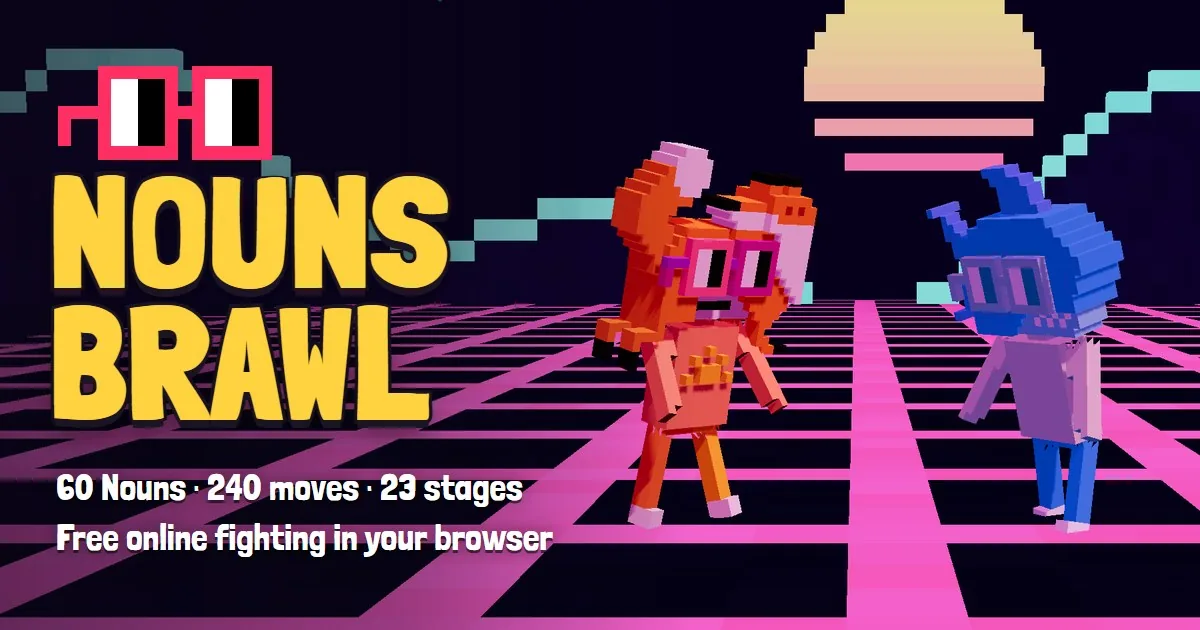
Add a winning cut scene and a finishing move per character. Add combos. Add online play. Keep iterating and keep improving it.
That prompt bundles three features; it worked because the game was already solid. Take them one at a time.
Step 7: Cut scenes and finishers
A finishing move is a camera move, an animation and a sound landing together. Ask Claude to build a small timeline system: camera keyframes, a slow-motion window, a flash, then the win pose. Every cut scene must be skippable.
Step 8: Make it run on phones
Most of your players will be on a phone, and a laptop hides performance problems. Give Claude a budget and ask it to measure, not guess.
Add an on-screen debug overlay (toggle with backtick) showing fps, draw calls and triangle count. Then do a performance pass for mid-range Android phones: cap pixel ratio at 1.5, use one shadow-casting light, share materials between fighters, reuse geometry for stage props, and pause rendering when the tab is hidden. Add Low, Medium and High quality presets and pick one automatically from the first 3 seconds of frame times. Report before and after numbers.
Step 9: Online play
Online play is the hardest step and the one to leave until last. A simple, common pattern: one player creates a room, gets a short room code, and the friend types it in. Underneath, the browsers need some way to talk, usually a small server or a peer-to-peer connection such as WebRTC with a server to introduce the two players. Replays fit naturally here: if the game is deterministic, a replay can be just the recorded inputs.
Plan first. Add online play for two players using rooms: Create Room shows a 5-character code and a share link, Join Room takes the code. Compare two or three approaches for our setup (static site, low budget), recommend one, and explain how inputs are synced and what happens at 150 ms ping or when a player disconnects mid-round. Do not build until I approve. Then add replays that store inputs only, with a share link.
Step 10: Deploy it
A three.js game built with Vite is a static site, so free or low-cost static hosts work. Ask Claude to set up the build, add a web app manifest and service worker so players can install it and play offline, and write a short checklist you run before every release. Noggles games work this way: installable, and playable offline after the first visit.
A portfolio project for teens and college students
A finished browser game is one of the best portfolio pieces a student can show: a link anyone can open, real problems solved, and a git history that proves the work. Write up the bugs you hit and how you fixed them; that is what interviewers ask about. Anthropic’s consumer terms require account holders to be 18 or over, so a 14-year-old builds this with a parent who owns the account and sits in on the sessions. Good next reads: vibe coding for teenagers, AI prompting for college students and AI fundamentals for students. For more prompts across genres, see our AI game development prompts, and for the OpenAI route, game development with GPT-6 Astra.
You are still the game designer. Claude writes and fixes the code, but it cannot tell whether a combo feels fair or a stage is fun. Play every build yourself, and have a human check anything you publish, especially online features that other people’s children may use.
Learn the workflow with us
Everything above, the plan-first habit, precise bug reports, one change per round, is what we teach in our two-day AI Vibe Coding course, where participants build and deploy working apps with Claude Code. If you want to go deeper on Claude Code itself (skills, sub-agents, MCP connectors and multi-agent workflows), our Claude and multi-agent orchestration course covers it in 40+ exercises. See also Claude Code for business teams.
Two hands-on days building and deploying real apps with Claude Code. The same plan, build, test and fix loop you need for a browser game.
Next public class: 5–6 December 2026 at Worq Subang · seats available
Individuals, students and parents can also join our public classes directly; no HRDC claim is needed.
HRD Corp claimable. AITraining2U is an HRD Corp registered training provider. Our public and in-house courses are claimable under the HRD Corp Claimable Courses (SBL-KHAS) scheme, and we prepare the grant paperwork with you. See HRDC-claimable AI training: courses, costs and how to claim.