OpenAI & ChatGPT Training in Malaysia
Custom GPTs, Agents & Codex
Hands-on OpenAI training for Malaysian teams — go beyond basic prompting to build custom GPTs and workspace agents, run Deep Research, and ship real work with Codex. A 2-day HRD Corp claimable workshop in Kuala Lumpur.

Choose Your Workshop Date
Seats are filling up fast! Book now to secure your spot.
Public Training
Dates Coming Soon
2 Days · Thursday & Friday
Private Training
Custom Dates
The OpenAI Stack
Three Surfaces, One Platform
Master the full OpenAI stack — the chat surface your whole team uses, the agents you configure for your business, and the coding agent that ships work.
ChatGPT
The Everyday Work Surface
Where your team already works. Projects to keep context together, Deep Research for multi-source analysis, Canvas for long-form drafting, and Company Knowledge to ground answers in your own documents.
GPTs & Agents
Your Configured AI Coworkers
Package a repeatable job into a reusable teammate. Build custom GPTs with your own instructions and knowledge, then graduate to workspace agents that connect to your business apps and run multi-step work.
Codex
The Coding Agent
OpenAI's coding agent — in ChatGPT, in your terminal, and inside VS Code or Cursor. It reads a repository, makes the change, runs the tests, and reviews pull requests, so engineering work gets delegated rather than typed.
Extend with Connectors, Apps & MCP
Agents are only as useful as what they can reach. We wire ChatGPT into the systems your business actually runs on.
Connectors
Connect ChatGPT to Google Drive, SharePoint, Slack, GitHub and more so answers are grounded in your real files instead of generic knowledge.
Apps & Actions
Give a GPT the ability to call an external API — look up a record, create a ticket, or post an update — so it acts instead of only advising.
MCP Servers
Model Context Protocol is the open standard for exposing internal tools and data to AI agents — the same plumbing behind Codex tool connections.
Know which model to reach for
The OpenAI Model Line-up
Most teams use one model for everything and wonder why costs climb and quality wobbles. You'll leave knowing exactly which one to pick per task.
Updated for GPT-6 · September 2026
Open ChatGPTGPT-6 Astra
Frontier · agents
OpenAI's most capable model. Built for long agentic tasks: operating a browser and computer, and hard software engineering in Codex. Save it for the work where depth matters more than cost.
GPT-6 Sol
Everyday work · coding
The workhorse for drafting, analysis, reconciliation and coding. Brings much of Astra's reliability at a far lower cost, with more reasoning than Luna.
GPT-6 Luna
Fast · high volume
The fastest, cheapest option for summarising documents, extracting data and quick answers at scale. This is where automation budgets are won or lost.
Image, voice & vision
Generate visuals, read scanned documents and invoices, and run voice conversations — all from the same platform your team already logs into.
Real example: a custom GPT built in this workshop can read a supplier contract from Google Drive, pull the payment terms into a comparison table, draft the negotiation email, and hand the summary to a colleague — while Codex separately updates the internal tool that tracks it. Different models, one platform.
Before & After OpenAI
From Chatbot To Coworker
Most teams already have ChatGPT open. The gap is that they use it as a search box instead of a system that does the work.
How most teams use ChatGPT today
- One-line prompts, then heavy editing of a generic answer
- Re-typing the same context into every new chat
- Answers that ignore company policy because it never saw the documents
- Every person prompting differently, with no shared standard
- Staff pasting sensitive data into personal accounts
After this workshop
- Structured prompts and Projects that hold context across a whole workstream
- Custom GPTs that package a repeatable job once and get reused by the team
- Connectors and Company Knowledge grounding answers in your real documents
- Deep Research producing sourced briefings in minutes instead of days
- A workspace with admin controls, so data governance is set at the org level
Designed for SME owners, department heads, and technical teams who want ChatGPT to produce finished work, not first drafts.
8 Hands-On Labs
What You'll Build
You leave with working assets, not notes. Every lab produces something you can use at your desk the next morning.
Labs 1-4: ChatGPT & Custom GPTs — Everyday Business Work
Your Prompt System & Project Workspace
Build a reusable prompt framework and set up a Project that holds files, instructions and context — so you stop re-explaining yourself in every new chat.
Market & Competitor Briefing
Run Deep Research to produce a sourced competitor or market briefing, then pressure-test the citations — including how to spot where the model is over-claiming.
Spreadsheet & Document Analysis
Upload a messy workbook or a stack of invoices and have ChatGPT reconcile, chart and explain the variances — with a human check on every number that matters.
Build Your First Custom GPT
Turn one repetitive job — SOP answers, proposal drafting, tender screening — into a custom GPT with your own instructions and knowledge files, then share it with your team.
Labs 5-8: Agents & Codex — Automation That Ships Work
Ground ChatGPT In Your Own Documents
Wire up connectors and Company Knowledge so ChatGPT answers from your SOPs, policies and drive — and learn what to do when it still can't find the answer.
A Workspace Agent That Runs A Process
Go beyond chat: configure an agent that takes a goal, works through the steps across your connected apps, and returns finished output for review.
Ship A Change With Codex
Point Codex at a real repository from the CLI or the VS Code extension: describe the change, let it edit and run the tests, then review the diff before it lands.
Your Company AI Policy & Rollout Plan
Draft the workspace settings, data rules and usage policy your organisation actually needs — plus a 90-day rollout plan mapped to the jobs you automated this week.
From Prompting To Production
How to move a team from casual ChatGPT use to automation you can trust.
1. PROMPT
Get consistent, high-quality output from the chat surface your team already has open.
2. PACKAGE
Turn a repeatable job into a custom GPT so the whole team gets the same result, not just your best prompter.
3. CONNECT
Give agents access to your real files and systems so they act on facts, not guesses.
4. GOVERN
Set workspace controls, data rules and human checkpoints before you scale it across the company.
Module Breakdown
01 Day 1: ChatGPT For Real Work & Custom GPTs
- Prompting That Holds Up: Structured prompting, role and format control, few-shot examples, and how to tell when the model is confidently wrong.
- Choosing Your Model: GPT-6 Astra vs Sol vs Luna — matching the model to the task so you're not overpaying for simple work or under-powering hard analysis.
- Projects, Canvas & Files: Keeping context across a workstream, long-form drafting, and analysing spreadsheets, PDFs and scanned documents.
- Deep Research: Commissioning multi-source research, reading the citations properly, and knowing the limits before you put it in front of a client.
- Custom GPTs: Instructions, knowledge files, conversation starters and Actions — then publishing and sharing them across your workspace.
02 Day 2: Agents, Codex & Safe Rollout
- Connectors & Company Knowledge: Grounding ChatGPT in Drive, SharePoint, Slack and internal systems so answers reflect your business, not the open web.
- From GPTs To Agents: Where custom GPTs stop and workspace agents begin — multi-step execution, tool use, and how to migrate what you built on Day 1.
- Codex For Teams: The coding agent in ChatGPT, the CLI and the VS Code / Cursor extension — delegating changes, running tests, and automated code review.
- MCP & The API: When to graduate from the ChatGPT interface to the API, and how Model Context Protocol exposes your internal tools to agents.
- Governance & PDPA: Workspace admin controls, data retention and training settings, what not to paste into a chat, and a 90-day rollout plan for your organisation.
Who Should Attend?
Built for teams that already use ChatGPT casually and want to make it produce real, reliable output.
Founders & C-Suite
Leaders who need to decide where AI actually belongs in the business — and what it should never touch.
Department Heads & Managers
Ops, finance, marketing, HR and legal leads who want a custom GPT their whole team can rely on.
Developers & Technical Leads
Engineers who want to run Codex properly — delegating real tasks, reviewing diffs, and wiring MCP tools.
Consultants & Strategists
Advisors adding OpenAI capability to their toolkit and client deliverables, with an honest view of the limits.
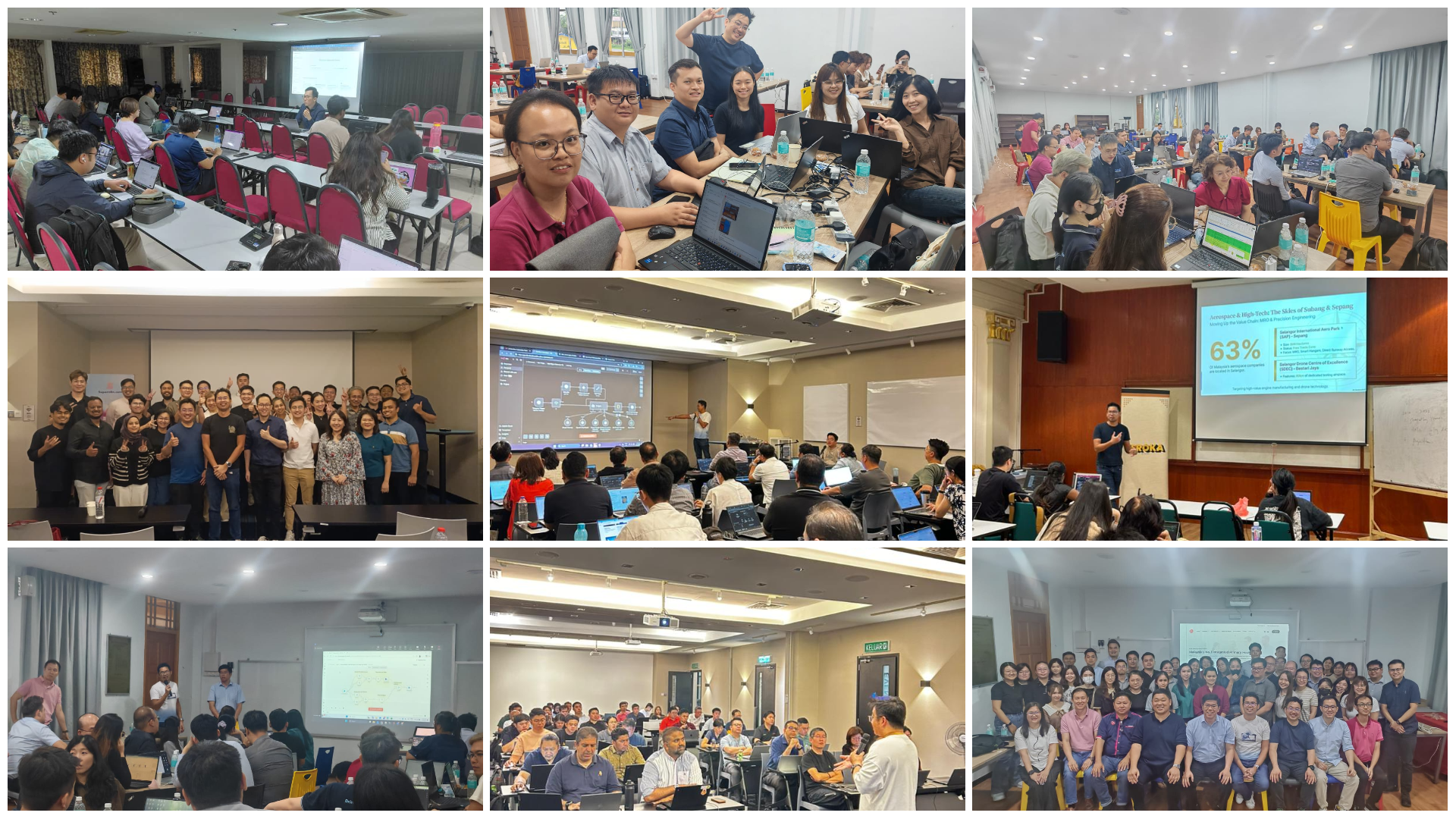
Experience the Workshop
A working session, not a webinar — you build on your own laptop, with your own data.
Your Trainers
Practitioners who use these tools in production, not just in slides.

Warren Leow
Founder & Strategy Lead
Founder of AITraining2U and Super Group. Former Bain & Company consultant; previously CEO of Designs.ai and Interim Group CEO of Inmagine Group. Helps Malaysian enterprises turn AI adoption into bottom-line results.
LinkedIn
Marcus Chia
AI Product & Coding Agents
Ships real-world AI workflows and prototypes with coding agents. Leads the Codex, MCP and build-your-own-tool sessions — turning vague problems into working software.
LinkedIn
Chan Wei Khjan
Business Process & Governance
Chartered Accountant (ACCA · FCA) and MIA AI Advisory Working Group member. Former Audit Partner at YYC. Leads the finance, data-handling and governance modules.
LinkedInHRDC Claimable Training
Upskill your team on the AI platform they already have open. Fully claimable via HRD Corp for registered Malaysian employers.
Quotation
Receive the official course outline and quote.
Grant Submission
Apply via e-TRiS under SBL-KHAS.
Official Provider
AITRAINING2U PLTQuestions & Answers
OpenAI Training FAQ
Course Fee
Transparent pricing for your OpenAI journey.
Introductory Offer: Groups of 5 pax & above enjoy 10% off
Self-Funded (non-HRDC)
Kickstart your OpenAI journey
- 2 full days of in-person intensive training
- Complete programme materials, prompts and templates
- Certificate of Completion
- 3-month post-training WhatsApp group support
- Admission to wider AI Learning Community
HRDC-Claimable
Upskill with your company's HRDC grant
- 2 full days of in-person intensive training
- Complete programme materials, prompts and templates
- Certificate of Completion
- 3-month post-training WhatsApp group support
- Admission to wider AI Learning Community
Make ChatGPT Actually Do The Work
Limited seats per cohort so every participant gets hands-on time with custom GPTs, agents and Codex.
Enroll via WhatsApp