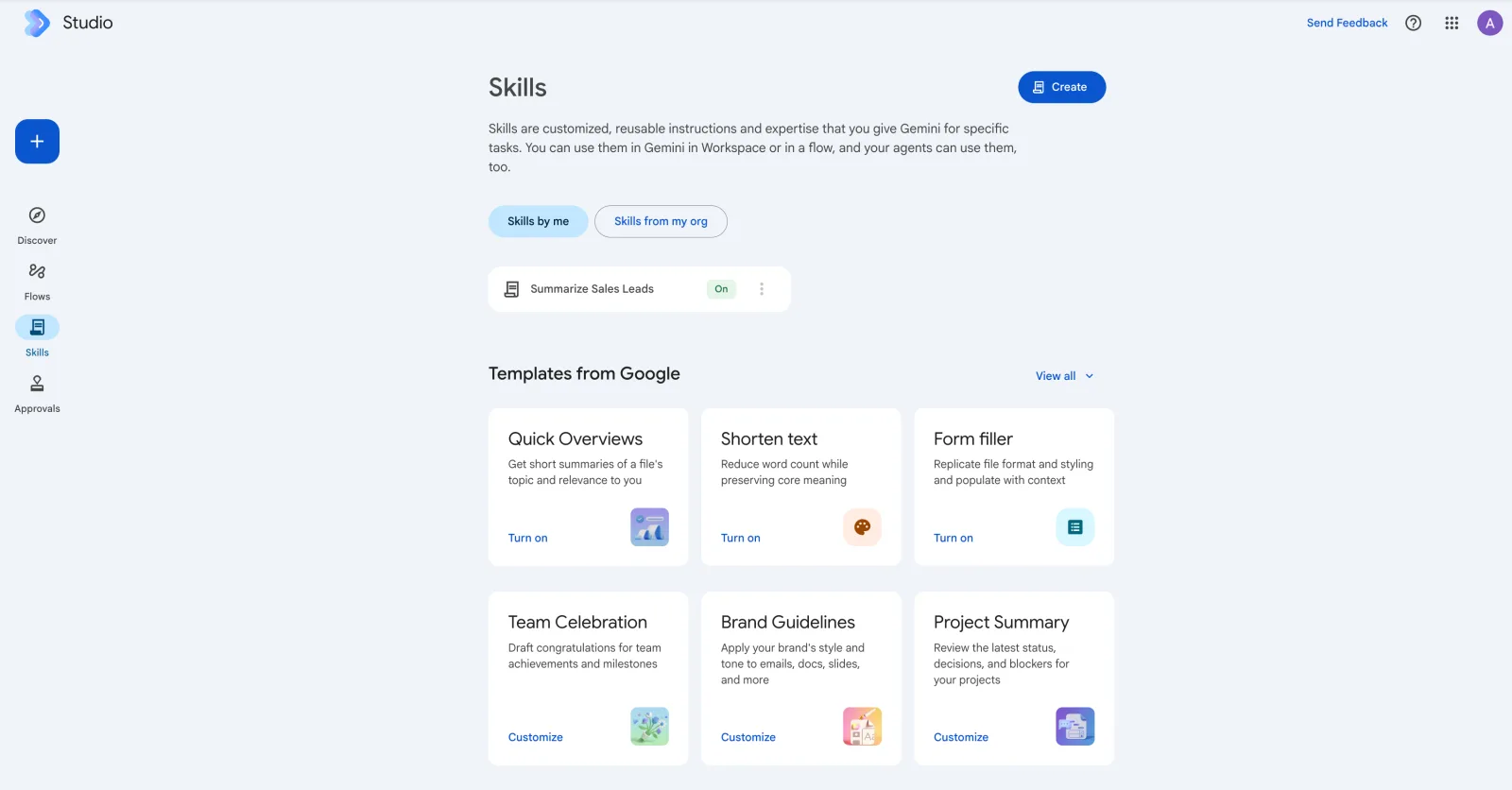
Short answer: a Skill in Google Workspace Studio is a saved, reusable set of instructions for Gemini: your brand tone, how to summarise a sales lead, how to check an invoice. You write it once, then call it with @ in Gmail, Docs, Slides, Drive or Chat, or use it as a step inside a flow. Approvals is the other half: a queue where a flow waits for a person to confirm before it takes a sensitive action, such as sending an email to a customer.
Google announced Skills at Cloud Next in April 2026, with the pitch that teams can turn standard operating procedures into something Gemini follows the same way every time. I think they are the most underrated part of Studio. Flows get the attention. Skills are what make the output sound like your company.

What a Skill is, and what it is not
Google’s own description on the page is plain: skills are customised, reusable instructions and expertise for specific tasks, usable in Gemini in Workspace or in a flow, and your agents can use them too. A Skill does not give Gemini new abilities. It tells Gemini how to use the ones it has, the same way a good SOP tells a new hire how this company writes a quotation.
That makes Skills different from a Gem. A Gem is a custom chatbot you talk to in the Gemini app. A Skill is a packaged instruction you pull into whatever you are doing, wherever you are doing it.
Google’s templates
| Template | What it does | Button |
|---|---|---|
| Quick Overviews | Short summary of a file’s topic and why it matters to you | Turn on |
| Shorten text | Cuts word count while keeping the meaning | Turn on |
| Form filler | Copies a file’s format and styling, then fills it with context | Turn on |
| Team Celebration | Drafts congratulations for team wins and milestones | Customize |
| Brand Guidelines | Applies your brand’s style and tone to emails, docs and slides | Customize |
| Project Summary | Reviews latest status, decisions and blockers | Customize |
As shown on the Skills page, September 2026. Google’s help centre also lists Customer Briefing, Contract Creation and Leadership Updates.
“Turn on” templates work as they are. “Customize” templates expect you to add your own material, such as your actual brand guideline PDF.
Build your first Skill in five steps
From SOP to Skill
- 1Pick a task you explain repeatedlyThe test: you have typed the same instructions into Gemini more than three times. Lead summaries, meeting minutes in your format and quotation drafts are common.
- 2Click Create on the Skills pageDescribe the skill in plain language. Studio drafts the instructions for you to edit.
- 3Attach the reference filesYour template, price list or style guide. The skill carries these files with it when shared.
- 4Test it on three real examplesCall it with @ in a Doc or Gmail draft. Fix the instructions until the third result needs no edits.
- 5Share it with the teamShare by link; colleagues get a copy with the files and setup intact. Your email is visible to them as the creator.
A worked example: the Sales Lead skill
Take a skill like the “Summarize Sales Leads” one in the screenshot. Written well, it does one job: given an enquiry email, it returns the company, the contact, the course or product they asked about, headcount, whether they mentioned HRDC funding, and a one-line next step, always in that order. On its own it saves a salesperson a minute per email. Used as a step in a flow triggered by new mail to the sales inbox, it fills a lead Sheet without anyone touching it. That is the pattern: the Skill holds the how, the flow holds the when.
Approvals: the human in the loop
Every flow can run unattended, which is also the risk. The Approvals page and the approval badges on the Flows list are how Studio handles it. When a step is marked as needing approval, the flow pauses there, the action appears in your Approvals queue, and nothing is sent until you confirm. In the Flows screenshot in our tutorial, a daily summary email is sitting behind two approvals.
Admins set the rules in Admin console → Apps → Google Workspace → Workspace Studio → Approvals. Custom steps and third-party integrations have their own approval settings, and webhooks follow the setting for sensitive steps. My rule for clients: anything that leaves the company (an email to a customer, a record in Salesforce, a Slack message to a partner) needs approval for the first month. Once the Activity log shows it behaving, relax it.
For admins: you decide whether people can use Skills at all, and separately whether they can share Skills outside the organisation. Turn external sharing off until you have reviewed what is being built. Skills carry their reference files, and a shared price list is still your price list.
Where to go next
If you have not built a flow yet, the flow tutorial comes first. For the full picture of plans, limits and admin controls, read our Google Workspace Studio guide. For the governance side, our AI usage policy template covers who may build and share agents.
Two hands-on days on Gemini in Gmail, Docs, Sheets and Meet, then building governed flows and agents on your own work. In-house for your team, on your Workspace tenant.
Public dates coming soon — in-house classes run on your dates.
HRD Corp claimable. AITraining2U is an HRD Corp registered training provider. Our public and in-house courses are claimable under the HRD Corp Claimable Courses (SBL-KHAS) scheme, and we prepare the grant paperwork with you. See HRDC-claimable AI training: courses, costs and how to claim.