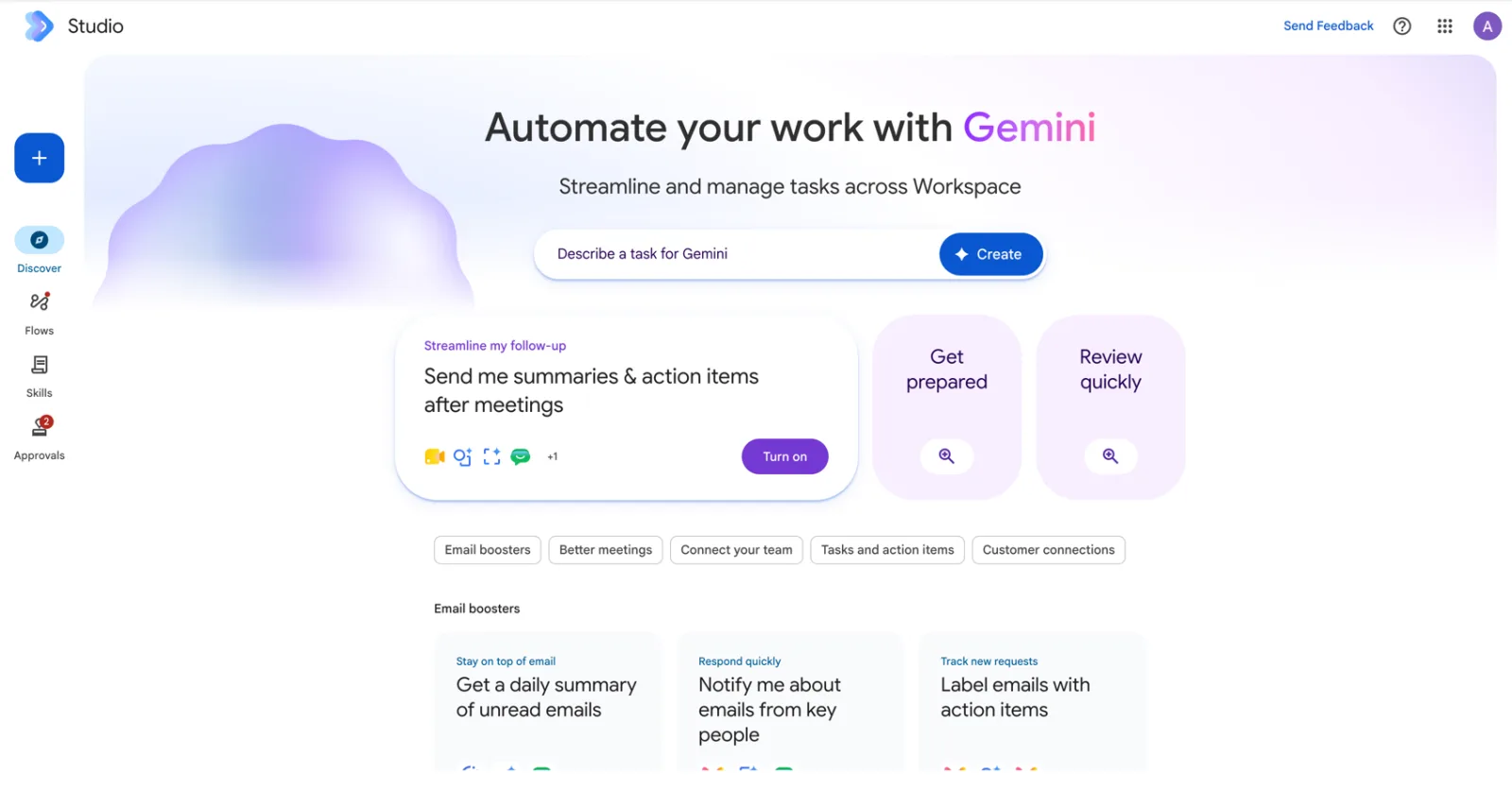
Short answer: Google Workspace Studio is the no-code tool inside Google Workspace for building AI agents that do repeat work for you. You describe a task in plain English, Gemini drafts a flow (a starter plus a chain of steps), and the flow then runs on its own across Gmail, Chat, Drive, Calendar, Sheets, Docs and a growing list of outside apps. It is included in Workspace Business and Enterprise plans, and you open it at studio.workspace.google.com.
Google made Studio generally available in December 2025. It grew out of an alpha called Workspace Flows, and during that alpha Google says agents handled more than 20 million tasks in 30 days. Since then it has picked up Skills (April 2026), an Approvals page, more languages, and on 17 September 2026 custom starters, webhooks and eight third-party integrations. If you last looked at it at launch, it is a different product now.

The four parts of Workspace Studio
The left-hand rail tells you how Google thinks about the product.
- Discover is the home page. A single box asks you to “Describe a task for Gemini”, with template cards underneath grouped as Email boosters, Better meetings, Connect your team, Tasks and action items, and Customer connections. Most people should start here, not with a blank flow.
- Flows lists everything you have built, with an on, off or draft status and an Activity tab showing each run step by step.
- Skills holds reusable instructions for Gemini, such as your brand voice or how to summarise a sales lead. A skill can be used inside a flow or called with
@in Gmail, Docs, Slides, Drive and Chat. We cover these in our Skills and Approvals guide. - Approvals is the queue of actions a flow wants to take but is waiting for a human to confirm.
How a flow is put together
Every flow has exactly one starter and up to 20 steps. The starter is the event or schedule that sets it off. The steps are what happens next. Steps pass information to each other as variables, so the subject line picked up by the starter can be fed into a Gemini prompt, and Gemini’s answer can be written into a Sheet two steps later.
The step list is where Studio differs from older rule-based automation. Alongside ordinary actions like “Add a row” or “Send a reply”, there is a block of AI steps. Decide lets a flow branch on a judgement call (“is this customer angry?”) rather than a keyword match. Extract pulls order numbers, dates or action items out of free text. Ask a Gem hands the work to a Gem you have already set up in Gemini.
Who can use it, and on which plan
| Workspace edition | Studio included? | Notes |
|---|---|---|
| Business Starter, Standard, Plus | Yes | Business Standard and Plus can buy the AI Expanded Access add-on for higher AI limits |
| Enterprise Standard, Plus | Yes | Same add-on available |
| Education (Fundamentals, Standard, Plus) | Yes, when the admin enables Gemini | AI features are off for users under 18 on school accounts |
| Personal Gmail accounts | No | Studio is a Workspace product; some starters and steps need a work or school account |
Sources: Google Workspace Studio product page, Workspace Updates (Feb and Sept 2026), Workspace Studio Help. Checked 19 September 2026.
Two things trip up Malaysian teams. First, the admin has to switch it on: Admin console → Apps → Google Workspace → Workspace Studio. Second, the interface languages are English plus French, German, Italian, Japanese, Korean, Portuguese and Spanish. Bahasa Malaysia and Chinese are not on Google’s list yet, so plan for staff to build in English even if the emails they process are in BM.
The limits worth knowing before you roll it out
| Limit | Value | What it means in practice |
|---|---|---|
| Flows you can create | 25 | Counts every flow you own, on or off |
| Steps in one flow | 20 | Plan long processes as two flows |
| Active flows started by Gmail | 25 | Across all your email-triggered flows |
| Runs per day | A daily cap on all your flows combined | Google does not publish the number; hitting it stops flows until the 24-hour reset |
| Promotional access | Ends 30 September 2026 | Google lists usage-limit enforcement for Studio starting 1 October 2026 |
Sources: Workspace Studio Help, “Learn about Workspace Studio limits”; Google Workspace Admin Help, “About AI usage limits”. Limits are subject to change.
1 October 2026 matters. Google’s admin help page lists Workspace Studio as “promotional access”, with limit enforcement starting 1 October 2026. If your team has built flows that run every minute, look at the Activity tab now. Google’s own advice: run schedules less often and make starters narrower, for example only emails from one sender.
What people actually build first
Google’s Malaysian product page leads with four examples: summarise upcoming meetings in Chat, capture meeting action items and draft the follow-up email, label high-priority emails, and save attachments to Drive while logging them in Sheets. That matches what we see in class. The first flows that stick are small, personal and email-heavy. Google’s launch post cites Kärcher cutting drafting time by 90% on a planning task, and that is the more ambitious end.
Our advice is to pick one irritation you have every day, build that, and live with it for a week. Our step-by-step flow tutorial walks through six that work well for Malaysian sales, finance and operations teams, and our list of 20 Workspace Studio automations every business should have gives you the recipes for the rest.
Security and admin controls
By default, a flow can reach the same Workspace data as the person who built it. That is convenient and also the thing your IT team should think about. Admins can block agent access across the organisation, pause or narrow a single flow in the Agent access management dashboard, stop people sharing flows, block specific service steps, and decide whether Gemini steps may search the public web. The new third-party integrations, custom steps and webhooks all arrive off by default, and sensitive steps can be set to need human approval. Pair this with a short written policy; our AI usage policy template is a good starting point, and it lines up with PDPA obligations.
Where Studio fits next to the rest of Gemini
Gemini in the side panel of Gmail or Docs helps you while you work. Studio works when you are not there. If your team is still getting comfortable with the first, start with our guide to Gemini in Docs, Gmail and Meet. If you are weighing Studio against n8n or Microsoft Copilot Studio, read our comparison. For finance-specific agents, see agentic finance automation with Gemini.
Two hands-on days on Gemini in Gmail, Docs, Sheets and Meet, then building governed flows and agents on your own work. In-house for your team, on your Workspace tenant.
Public dates coming soon — in-house classes run on your dates.
HRD Corp claimable. AITraining2U is an HRD Corp registered training provider. Our public and in-house courses are claimable under the HRD Corp Claimable Courses (SBL-KHAS) scheme, and we prepare the grant paperwork with you. See HRDC-claimable AI training: courses, costs and how to claim.