
Microsoft has quietly changed how you pay for its most powerful AI. Alongside the familiar per-user Microsoft 365 Copilot subscription, the new agentic experiences — Copilot Cowork, Copilot Studio agents, Dynamics 365 agents, Power Platform AI and the Work IQ APIs — run on a usage-based currency called Copilot Credits. If your finance team is about to budget for this, you need to know two things: what a credit costs, and what real work actually consumes. Microsoft's June 2026 Copilot Credits Guide answers both — here is the plain-English version, with ringgit estimates.
What are Copilot Credits?
Copilot Credits are the common currency for usage-based AI across the Microsoft ecosystem. Instead of a flat per-seat fee, the number of credits a task consumes scales with its complexity — a quick draft costs little; a multi-step analysis costs a lot. Credits are pooled at the tenant level, so your total bill is the sum of everything consumed across Cowork, Copilot Studio, Dynamics 365, Power Platform and Work IQ. That pooling is what lets an admin centrally govern spend, which we’ll come back to.
The headline price: US$0.01 per credit
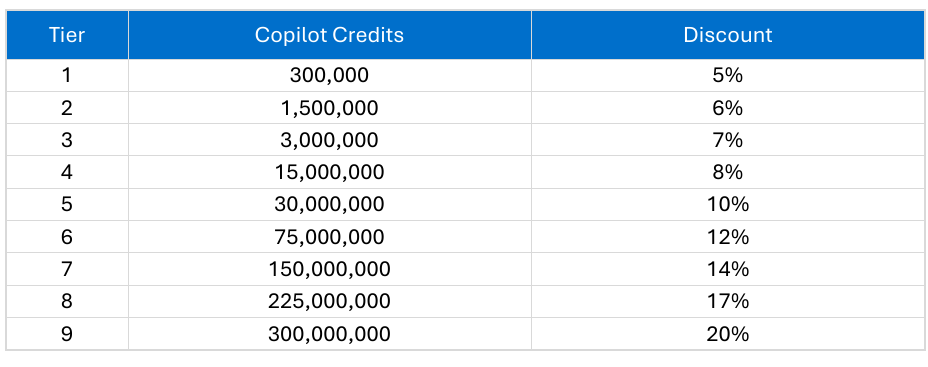
There are two ways to buy. Pay-as-you-go is the simple one: US$0.01 per Copilot Credit, billed in arrears at the end of the month, no up-front commitment. That single number is the anchor for every estimate in this article. The second option, the Copilot Credit Pre-Purchase Plan (P3), is a one-year pay-upfront pool that earns a volume discount — from 5% at 300,000 credits up to 20% at 300 million. Unused pre-purchased credits expire at the end of the year, and both options draw down your Microsoft Azure Consumption Commitment (MACC).
What a real task costs — Copilot Cowork
The abstract number only matters once you see what work consumes. Copilot Cowork is Microsoft’s agentic system that plans and executes multi-step work — sending emails, scheduling, creating documents, posting in Teams. Microsoft groups Cowork tasks into Light, Medium and Heavy profiles:
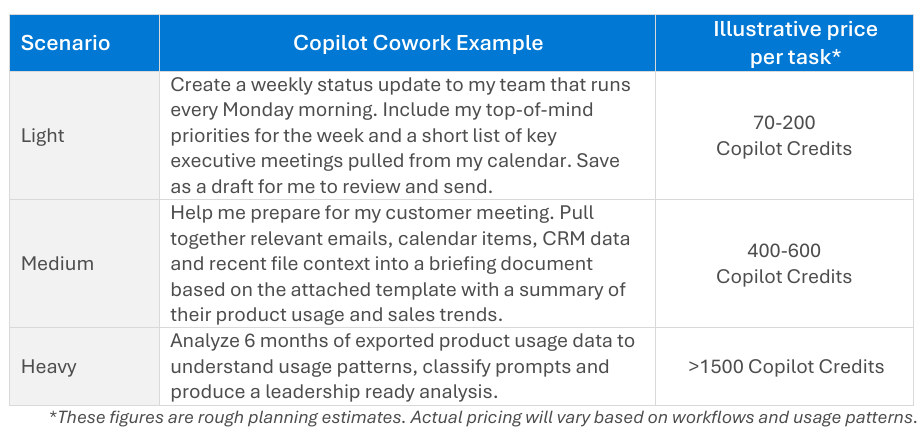
Convert those credit ranges at the pay-as-you-go rate and the cost per task becomes concrete — here it is in US dollars and indicative ringgit:
| Cowork task | Copilot Credits | Cost (USD @ $0.01) | Indicative RM* |
|---|---|---|---|
| Light | 70–200 | $0.70 – $2.00 | RM3 – RM9 |
| Medium | 400–600 | $4.00 – $6.00 | RM19 – RM28 |
| Heavy | 1,500+ | $15.00+ | RM70+ |
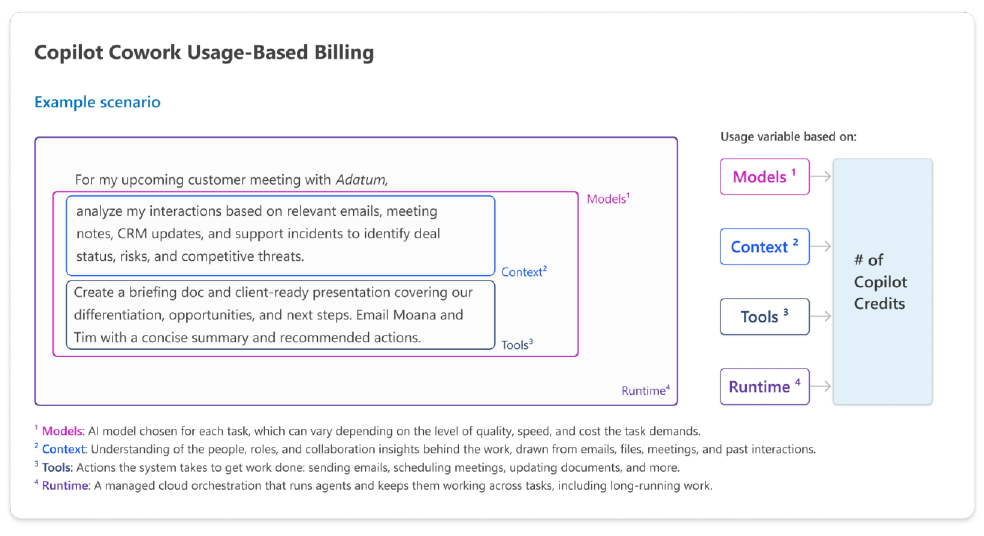
So a routine Monday-morning status update might cost a few ringgit; a full leadership-ready analysis of six months of data can run past RM70 in a single task. Neither is expensive on its own — the budgeting risk is volume, which is why Microsoft breaks a task down into four cost buckets: the models chosen, the runtime orchestration, the context pulled from your emails and files, and the tools the agent uses to act.
Work IQ API costs
The Work IQ APIs expose Microsoft’s workplace-intelligence layer to your own agents (built in Copilot Studio, Azure AI Foundry, or elsewhere). Billing is two-part: a variable charge for query-style consumption (grounding, retrieval, reasoning) and a static 0.1 credit per Tools API call for actions. Representative queries land far cheaper than Cowork tasks:
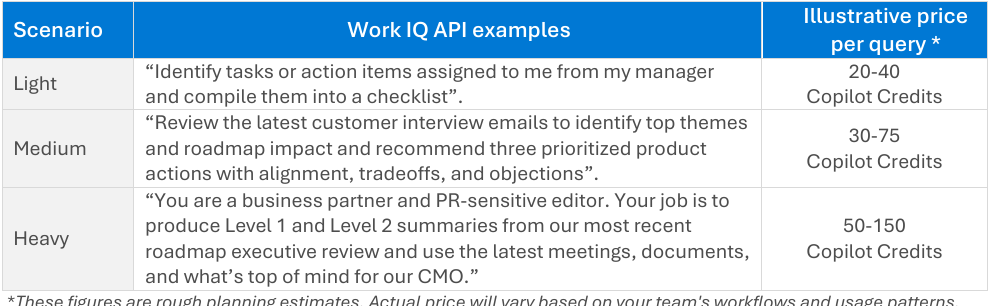
Two useful notes: routing more processing through the Work IQ runtime can cut the tokens needed for context and tools by up to 80%, lowering credit consumption; and this is the same intelligence that powers agentic finance workflows — see our Copilot 365 finance automation guide.
What’s still included in your subscription (no extra credits)
This is the part that saves money: a lot of everyday Copilot use does not touch credits at all. The per-user Microsoft 365 Copilot subscription still includes Copilot Chat, Copilot inside Word, Excel, PowerPoint, Outlook and Teams, the built-in Researcher, Analyst and Facilitator agents, and Work IQ grounding across your emails, files and calendar — all with no incremental charge. Credits only apply to the usage-based, agentic experiences on top: Cowork, Copilot Studio agents, Dynamics/Power Platform AI and the Work IQ APIs. Notably, Cowork requires a Microsoft 365 Copilot licence as a prerequisite and is billed purely on usage — no Cowork allowance is bundled in the subscription.
How to estimate your monthly spend
Microsoft’s recommended method is refreshingly simple, and it’s the same one we teach finance teams:
- Count users who’ll use Cowork, grouped by persona (e.g. executives, analysts, ops).
- Estimate prompts per persona per month, split across Light / Medium / Heavy.
- Apply an average price per prompt from the table above.
Multiply through and you have a monthly credit forecast you can pressure-test. For a Malaysian SME, a realistic starting point — say 20 users doing mostly Light and a few Medium Cowork tasks a week — often lands in the low four figures of ringgit per month, before any pre-purchase discount. The number moves fast with heavy usage, so model it before you switch it on.
Governing the spend (the FinOps bit)
Because credits pool at the tenant level, the risk is a runaway bill from a few power users. Microsoft manages this through the Microsoft 365 admin center: admins set spend policies, define usage thresholds, and monitor consumption across every workload — the FinOps controls that let you scale AI without nasty surprises. Treat Copilot Credits like any other cloud meter: turn it on with a budget, a threshold alert, and an owner.
The Malaysian bottom line
Copilot Credits make Microsoft’s agentic AI genuinely affordable to start — pennies per task — but the total depends entirely on how well your team uses it. Untrained users burn credits on Heavy tasks that a Light prompt could have handled; trained users get more done per credit. That’s the real ROI lever. Our Microsoft Copilot 365 course and curriculum guide cover exactly this — and the upskilling is HRDC-claimable for eligible employers.