Microsoft Copilot 365 Training in Malaysia
Copilot Studio, Agent 365 & Agents
Hands-on Microsoft Copilot training for Malaysian teams — work faster across Word, Excel, Teams & Outlook, then build governed AI agents with Copilot Studio and Agent 365. A 2-day HRD Corp claimable workshop in Kuala Lumpur.
Choose Your Workshop Date
Seats are filling up fast! Book now to secure your spot.
Public Training
August 26-27, 2026
Wednesday & Thursday
Private Training
Custom Dates
Microsoft Copilot Stack
Three Surfaces, One Platform
Master the complete Microsoft Copilot stack — author, govern, and deploy AI agents across Microsoft 365, Teams, and the web.
Copilot Studio
Low-Code Agent Builder
The authoring surface for custom Copilot agents. Build, test, and publish agents with low-code triggers, AI action nodes, and Model Context Protocol tool connections.
Microsoft 365 Copilot
Enterprise Copilot Chat Surface
The Copilot experience embedded across Word, Excel, PowerPoint, Outlook, Teams, and Copilot Chat. Surface custom agents and connected apps directly where your team already works.
Agent 365
Enterprise Agent Control Plane
The centralised control plane for managing agents across your enterprise. Inventory every agent, set permissions, monitor behaviour, and enforce DLP policies — all from one admin console.
Extend with Apps, Workflows & Connectors
The Microsoft Copilot ecosystem ships with hundreds of connectors and partner-built apps so your agents act across the systems your business already runs on.
Apps in Agents
Interactive partner apps embedded directly in Copilot Chat so agents execute actions without context-switching.
Workflows
Intelligent workflows in Copilot Studio that embed agents within deterministic steps. Combine adaptive reasoning with predictable process logic, with admin-controlled DLP enforcement.
MCP Connectors
Model Context Protocol servers and Power Platform connectors that bridge Copilot agents to Dynamics 365, SharePoint, SQL Server, and any internal API — securely and at scale.
Works natively with
Microsoft 365 & Office
Every Copilot agent you build can read, write, and trigger actions across the Microsoft 365 apps your team already uses every day.
Sign in to Office 365Real example: a Copilot agent built in this workshop can read a contract in Word, summarise key terms into Excel, draft a follow-up email in Outlook, post the status to a Teams channel, file the document in SharePoint, and present the deal pipeline in PowerPoint — all from a single natural-language prompt.
Before & After Microsoft Copilot
The Productivity Multiplier
Participants report dramatic time savings across daily tasks after mastering the Microsoft Copilot stack.
Daily Time Saved
Automate repetitive tasks that previously consumed half your workday
Productivity Gain
SME owners and C-suites report tripling their output with AI agents
Hours Reclaimed Weekly
Process leaders redirect freed-up hours to strategy and growth
Before Microsoft Copilot
- Manually triaging 100+ emails every morning
- Hours spent on data entry, form filling, and report compilation
- Research tasks taking full days of browsing and note-taking
- Repetitive content creation consuming marketing team bandwidth
- Process bottlenecks requiring constant human intervention
After Microsoft Copilot
- Microsoft 365 Copilot triages inbox, drafts replies, and surfaces priorities in Outlook
- Copilot Studio agents process forms, update Dynamics 365, and generate Excel reports
- Copilot agents with web search & MCP connectors complete research in minutes, not days
- Copilot drafts PowerPoint decks, Word docs, and Teams messages on demand
- Intelligent workflows run with Agent 365 governance & human-in-the-loop oversight
Designed for SME owners, C-suite executives, and process leaders who want to reclaim their time and scale operations without scaling headcount.
8 Hands-On Labs
What You'll Build
Each lab deploys a production-ready Copilot agent for a real business function using Copilot Studio, Microsoft 365 Copilot, or Agent 365.
Labs 1-4: Microsoft 365 Copilot — Day-to-Day Productivity Agents
Auto Customer Follow-Up via Outlook
Microsoft 365 Copilot in Outlook drafts personalised follow-ups, tracks replies, and schedules next touchpoints automatically — logging every interaction to a SharePoint list.
Word Brief → Deck & Channel Copy
From a single Word brief, Microsoft 365 Copilot generates a PowerPoint pitch deck, LinkedIn copy, and Outlook email sequences — ready to publish.
Calendar & Meeting Orchestrator
Copilot manages your Outlook calendar, prepares pre-reads for upcoming Teams meetings, captures action items, and syncs notes to OneNote.
Automated Employee Onboarding
A Copilot agent provisions M365 accounts, sends welcome Outlook emails, books a Teams orientation, and tracks completion in a SharePoint list.
Labs 5-8: Copilot Studio + Agent 365 — Custom Enterprise Agents
SharePoint-RAG Knowledge Agent
Build a Copilot Studio agent that uses RAG over SharePoint document libraries to answer internal Q&A in Teams — grounded in your SOPs, policies, and product docs.
Excel-Native Financial Analysis & Reconciliation
Copilot in Excel performs ledger analysis, reconciles transactions, builds variance commentary, and flags discrepancies for human review — all in your workbook.
Scheduled Analytics & Auto-Send Reports
A Copilot Studio workflow runs weekly: pulls data into Excel, generates a PowerPoint summary, and sends to stakeholders via Outlook on a Power Automate schedule.
Ticket Triage & Outlook Reply Bot
A governed Copilot agent classifies Dynamics 365 tickets, looks up answers in the SharePoint knowledge base, drafts an Outlook reply, and escalates urgent cases to Teams.
Agent Governance Methodology
How to expand Microsoft Copilot automation without losing control.
1. DISCOVER
Map repetitive Microsoft 365 workflows where Copilot can drive measurable lift.
2. ARCHITECT
Map surfaces (Copilot Studio vs Microsoft 365 Copilot vs Agent 365) to specific reasoning requirements.
3. ORCHESTRATE
Deploy Microsoft 365 Copilot agents to handle multi-step autonomous tasks.
4. GOVERN
Enforce DLP policies, Agent 365 inventory, Analytics Viewer roles, and human-in-loop gates.
Module Breakdown
01 Day 1: Copilot Studio Authoring & Agent 365 Governance
- Copilot Studio Mastery: Low-code agent authoring — topics, triggers, AI action nodes, generative orchestration, and MCP tool connections.
- Microsoft 365 Copilot Mastery: Configuring AI-powered task automation for business workflows, form processing, data extraction, and cross-system orchestration.
- Connectors & MCP: Teaching Copilot agents to call Power Platform connectors, Dynamics 365, SharePoint, and any internal API via Model Context Protocol.
- Agent 365 Governance: Setting up centralised agent inventory, permissions, Analytics Viewer roles, DLP policies, and usage estimators.
- Guardrails & Safety: Output filtering, cost & capacity limits, custom metrics, and human-in-the-loop approval gates for production Copilot agents.
02 Day 2: Intelligent Workflows & Connected App Experiences
- Agent-to-Agent Architecture: Building supervisor Copilot agents that delegate to specialist sub-agents using A2A communication and Work IQ.
- Intelligent Workflows: Embedding Copilot agents inside deterministic process steps with AI action nodes for dynamic routing and content generation.
- Connected App Experiences: Surfacing partner apps directly inside Copilot Chat for seamless action execution.
- Copilot Cowork: Working alongside Copilot as an agentic teammate — a shared workspace where people and agents co-author, delegate multi-step tasks, and hold a persistent thread of context across the team.
- Custom Metrics & Work IQ: Defining outcome-based measurement, calling the Work IQ API, and surfacing agent ROI to leadership.
- Production Deployment: Publishing Copilot agents to Microsoft 365, monitoring with Agent 365 dashboards, scaling via the Agent Store, and managing capacity costs.
Who Should Attend?
Designed for professionals ready to deploy autonomous AI agents in their organisations.
Founders & C-Suite
Executives who want to understand how autonomous agents can transform operations and reduce manual overhead.
Department Heads & Managers
Leaders in ops, marketing, finance, or HR looking to automate repetitive workflows with multi-agent systems.
Technical Leads & Developers
Engineers ready to build, deploy, and govern production-grade Copilot agents using Copilot Studio and Agent 365.
Digital Consultants & Strategists
Advisors who want to add Microsoft Copilot capabilities to their consulting toolkit and Microsoft client deliverables.
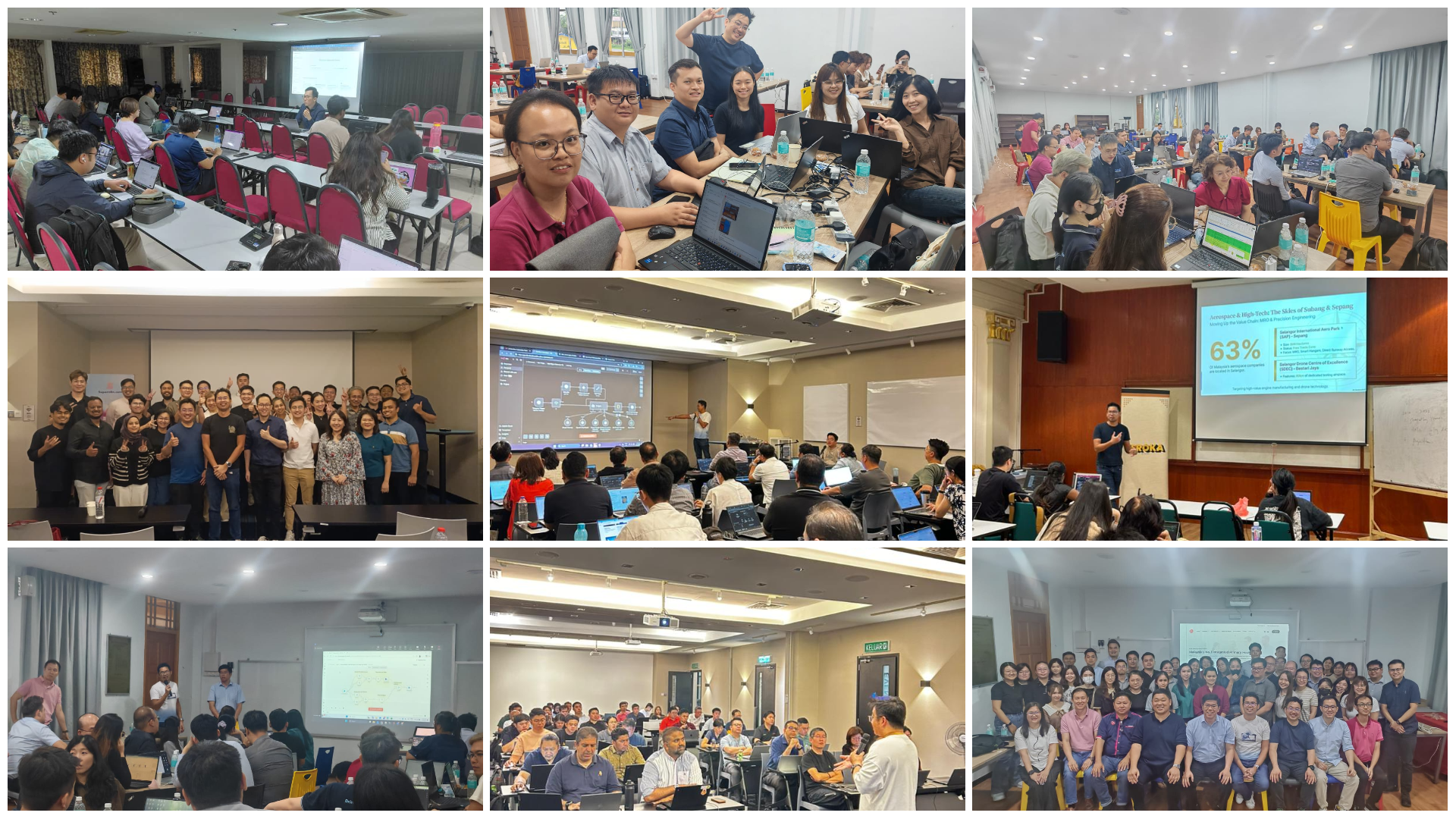
Experience the Workshop
High-energy environment where teams actually build Copilot agents, not just listen.
Automation Experts
Learn from Malaysia's top AI and Automation practitioners.

Chan Wei Khjan
Process Transformation Lead
Former Audit Partner at YYC. Expert in financial process automation and governance. Leads the technical implementation of n8n workflows for finance teams.
LinkedIn
Marcus Chia
Agent UX & Workflow Design
Specialist in human-agent interaction and designing autonomous workflows that don't break business logic.
LinkedIn
Warren Leow
Founder & Strategy Lead
Founder of AITraining2U. Helps Malaysian enterprises map Microsoft Copilot, Agent 365, and the wider M365 stack to real bottom-line growth — from C-suite buy-in to production rollout.
LinkedInHRDC Claimable Training
Upskill your operations team with the latest agentic tools. Fully claimable via HRD Corp for registered Malaysian employers.
Quotation
Receive official agentic course outline.
Grant Submission
Apply via e-TRiS under SBL-KHAS.
Official Provider
AITRAINING2U PLTQuestions & Answers
Automation FAQ
Course Fee
Transparent pricing for your Microsoft Copilot journey.
Introductory Offer: Groups of 5 pax & above enjoy 10% off
Self-Funded (non-HRDC)
Kickstart your Microsoft Copilot journey
- 2 full days of in-person intensive training
- Complete programme materials, tools and templates
- Certificate of Completion
- 3-month post-training WhatsApp group support
- Admission to wider AI Learning Community
HRDC-Claimable
Upskill with your company's HRDC grant
- 2 full days of in-person intensive training
- Complete programme materials, tools and templates
- Certificate of Completion
- 3-month post-training WhatsApp group support
- Admission to wider AI Learning Community

Build Your Copilot-Powered Enterprise
Limited seats per cohort to ensure hands-on guidance with Copilot Studio & Agent 365.
Enroll via WhatsApp