AITraining2U × Claude / Copilot
01 / 26
◄ ► or Space to navigate · G for slide menu · F for presentation mode · Esc to exit
AITraining2U
Webinar · For Founders, Business Owners & Team Leads

Grow Faster Than
Your Competitors with AI

Warren breaks down how AI-first companies are pulling ahead of rivals still running manual processes — the intelligence plays you run in Claude or Copilot, the n8n automations that keep them running without you, and the vibe coding that lets you ship a new experience in days.

Sections
Intel · Automate · Build
Format
Live · Hands-on
Take-home
Prompts + Blueprints
QR code linking to these webinar slides at aitraining2u.com
Scan for these slides
Follow along on your phone
Practical. Proven. Purposeful. — AITraining2U PLT
Your Trainers

Led by practitioners,
not theorists

Chan Wei Khjan

Chan Wei Khjan

Audit Partner, YYC · MIA Board

Chartered Accountant (ACCA · C.A.(M) · FCA Singapore) and MIA board member. Featured in Business Insider for pioneering AI inside the accounting profession.

Marcus Chia

Marcus Chia

AI Product Manager & Harness Engineering Expert

Builds and ships AI workflows in the wild — Claude projects, MCP servers, multi-agent pipelines and data dashboards. Turns messy business problems into working AI solutions.

Warren Leow

Warren Leow

Founder, AITraining2U PLT

Drives AITraining2U's mission to equip 100,000 Malaysians with practical AI skills — hands-on with AI agents, automation and applied analytics for enterprise teams.

Azhari A. Razak

Azhari A. Razak

Multi-Agent Systems Builder

Founder of Urbanite Enterprise, an AI consultancy for Malaysian SMEs. Nineteen years of mission-critical network operations at Telekom Malaysia, now delivering Claude, n8n and multi-agent workflows in production.

Goh Man Fye

Goh Man Fye

Founder, Wistify · AI for Healthcare

Pharmacist-turned-data-scientist with a Master in Data Science & Analytics. Has built production AI for triage, medical scribing and retinopathy screening, and speaks nationally on AI governance.

Warren leads today's session — every play paired with a prompt or an n8n workflow you can run the moment you're back at your desk.

Our Clients

Trusted by leading Malaysian organisations

BFM
CCM
CTOS
Commerce.Asia
Evolution Commerce
Gamuda
Gentari
Grab
IGB
Inside Scoop
Jaya Grocer
KLK
MoneyMatch
Mr DIY
Mydin
myNEWS
Pharmaniaga
PMG Healthcare
Ryt Bank
Shopee
Tealive
U Mobile
YYC
ZUS Coffee

Banking, telco, retail, healthcare, energy & government-linked companies — teams across Malaysia upskill with AITraining2U.
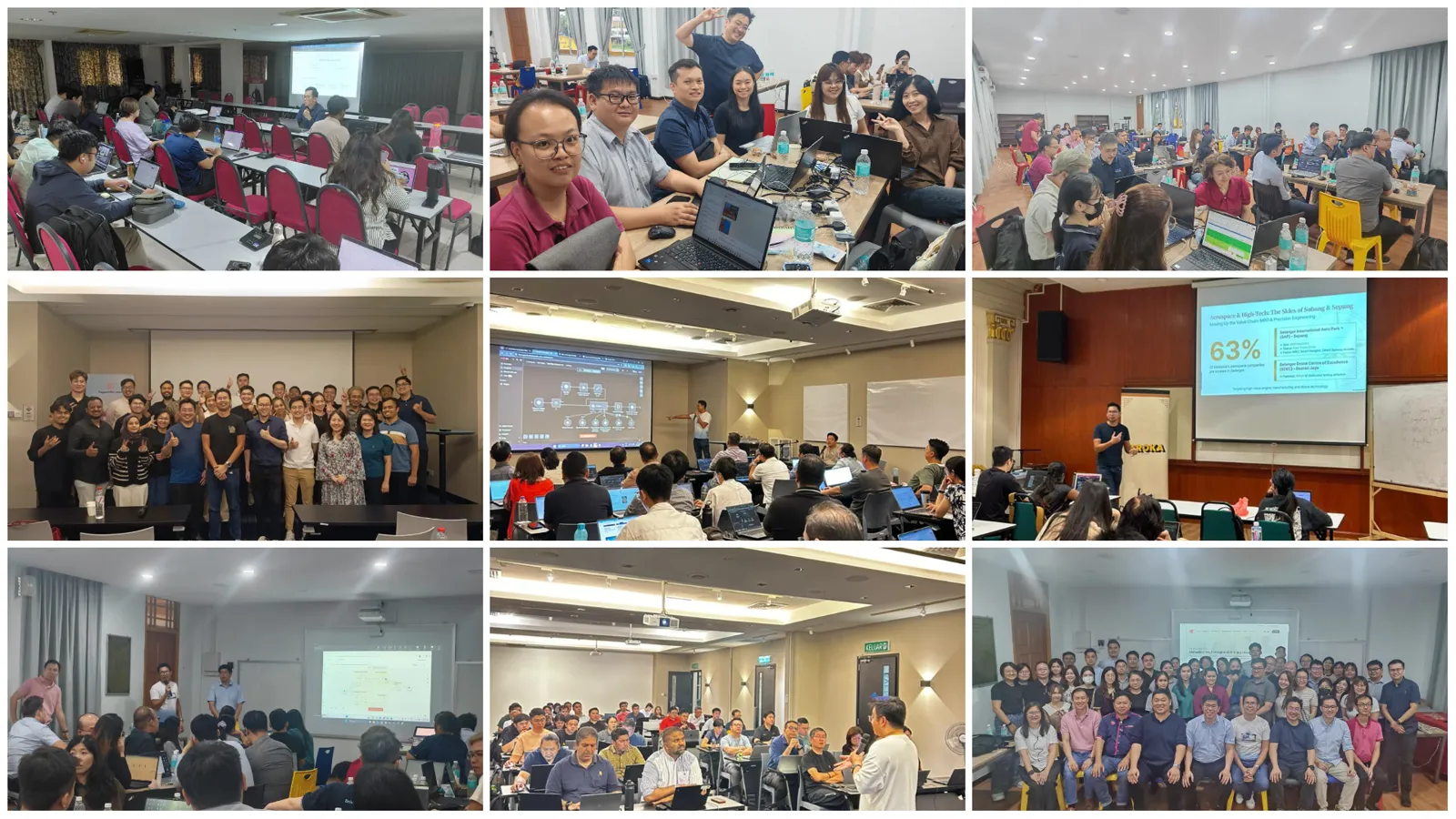
Proven Track Record 1,500+ professionals trained — and counting
Collage of AITraining2U training sessions across Malaysian enterprises and public workshops
HRDC-claimable Enterprise & public workshops Practical, hands-on, results-first
The Real Gap

Your competitors aren't
smarter. They're faster.

AI-first companies haven't found a better strategy. They've collapsed the time between knowing and doing — the competitor review that took a quarter now runs every Monday, and nobody has to remember to do it.

Meanwhile the manual shop still books a two-week “market study”, still benchmarks off a 2023 report, and still hears about a rival's price cut from a customer.

SAME WORK · TWO CLOCKS
Competitor research
Manual: 2 weeks, once a year  ·  AI-first: 1 hour, on demand
Industry benchmarking
Manual: a bought report  ·  AI-first: your numbers, scored monthly
Competitor news
Manual: you hear it late  ·  AI-first: flagged the morning it breaks
The process behind it
Manual: someone's calendar reminder  ·  AI-first: an n8n workflow that never forgets
Why This Is Urgent

The Exponential Gap

Technology compounds. Organisations don't — and the widening gap between the two is where your competitors either pull ahead or fall behind.

Time Pace Technology Understanding Change The Gap

Technology — Exponential

New models and tools compound on each other, doubling capability again and again.

Organisational Understanding — Linear

Awareness grows steadily as people are trained and exposed to what's possible.

Organisational Change — Linear, Slower

Process, structure and incentives move even more slowly than understanding does.

All three start from the same base. Left unmanaged, the gap between what technology can do and what the organisation can absorb is exactly where AI transformations stall — and it is the gap the rest of this session is about closing.

The Map

Three sections.
Six things you'll take home.

Section 1 · IntelligenceRun these in Claude — or Microsoft Copilot
1
Competitor Research
A sourced dossier on each rival — offer, pricing, ICP, proof — and the battlecard your team actually uses.
2
Industry Benchmarking
Your margins, CAC, revenue-per-head and cycle times scored against the industry median and top quartile.
3
Competitor News Monitoring
A watchlist that reads the web for you — launches, price moves, hires, funding — scored by how much it should worry you.
Section 2 · AutomationMake it run without you — in n8n
4
Process Automation with n8n
Take one repetitive process, map it to a trigger → steps → output workflow, and let an AI node do the judgement work.
5
The Always-On Competitor Watch
Sections 1 and 2 joined up: an n8n workflow that runs the intel every week and emails you only what matters.
Section 3 · BuildShip faster than they can scope — vibe coding
6
Vibe Coding for Building Velocity
Take an idea through the whole software life-cycle with AI in every phase — and put a working tool in front of real users this week.

Every example ships with copy-ready prompts — tap Copy, paste in, edit the bracketed bits, run.

Example 01Competitor Research

Know your rivals better than their own staff do

A dossier per rival
Claude reads their site, pricing page, careers page and reviews — and cites a source for every claim.
Turned into a battlecard
Where they beat you, where you beat them, and the exact line your sales team says when they come up.
Pricing & offer teardown
Tier by tier — what's bundled, what's upsold, and where your price is leaving money on the table.
Hiring & roadmap tells
Job ads leak strategy. Ten open enterprise-sales roles means they're coming upmarket — before the press release.
claude.ai · Competitor Dossier
RIVALS
Rival A
Rival B
Rival C
OUTPUT
Dossier
Battlecard
Price teardown
Live web Sourced
Build me a dossier on Rival A — offer, pricing, ICP, proof, weak spots.
Read 9 pages incl. pricing & careers. Tell: 11 open enterprise-AE roles + a new “Teams” tier → they're moving upmarket. Battlecard drafted →
Example 01 · PromptsCopy · Paste · Run

Competitor research prompt set

1 · Rival dossier
Using the live web, build a dossier on
these competitors: [Rival A, Rival B,
Rival C]. We are [what we do] in
[country / region].

For EACH, visit their site, pricing
page, careers page and any recent
reviews, then capture:
- Positioning & target ICP
- Core offer + top 3 features
- Pricing tiers (price + what's in)
- Proof: logos, case studies, funding
- Hiring signals — what the open roles
  say about where they're heading
- Sharpest message & weakest spot

One comparison table, a row per rival.
Cite a source URL for every fact and
flag anything you couldn't verify.
2 · Battlecard
Here's us: [1-paragraph description +
our pricing + our 3 best proof points].

Using the dossier above, build a
one-page battlecard per rival:
1. Where they genuinely beat us (be
   honest — no spin).
2. Where we beat them, with the proof
   point that lands.
3. The 3 objections a buyer raises when
   they've seen that rival, and the
   exact reply — under 30 words each.
4. The trap question that exposes their
   weakness without trashing them.

Then rank the rivals by how much of our
pipeline they actually threaten.
3 · Pricing teardown
Now tear down the pricing.

1. Lay every rival's tiers side by side
   with ours: price, what's bundled,
   what's an add-on, contract length.
2. Work out their effective price per
   [seat / outlet / transaction] — not
   the headline number.
3. Where are we over- or under-priced
   for what we deliver? Quantify it.
4. Propose 2 pricing or packaging moves
   we could make this quarter, with the
   risk of each.

Show your assumptions and cite the
pricing pages you read.

Tip: same play in either stack — Claude + web search, or Copilot + Microsoft 365.

Example 01 · WorkedIllustrative Example

What comes back: the rivals, laid bare

Our running example — “Kopi Kita”, a fictional 14-outlet KL specialty-coffee chain — runs the dossier prompt on its three closest rivals:

Rival dossier · Malaysian coffee chains
RivalAvg cupSharpest edgeWeak spotHiring tell
Rival ARM9–12App + scaleBean quality12 tech roles
Rival BRM7–10Outlet densityThin marginsFranchise ops
Rival CRM15–20Craft + loyaltySlow service2 baristas
Kopi KitaRM11–14— (to define)
The tell

Rival A is hiring 12 engineers and a “subscription growth” lead. A weekday coffee subscription is coming — the exact niche Kopi Kita was about to enter. Move now or pick another lane.

BATTLECARD — one line each
  • vs A: “Cheaper per cup — but ask what bean.”
  • vs B: “They're everywhere; we're worth the walk.”
  • vs C: “Same grade, half the wait, RM5 less.”

Illustrative figures for teaching — not real company data. A live run cites every source URL.

Example 02Industry Benchmarking

Find out where you're actually behind

1
Build the benchmark set
The 8–10 metrics that decide who wins in your industry — with median and top-quartile values, each traced to a source.
2
Score your numbers against it
Paste your actuals. Every metric lands in a quartile, with the gap quantified in ringgit — not in adjectives.
3
Separate signal from noise
Two or three gaps actually move the business. The rest are vanity. Claude ranks them by value at stake and effort to close.
Re-scored every month
A benchmark you check once a year is trivia. Put it on a schedule and it becomes a scoreboard.

Careful: benchmarks are directional. Always make the model show the source and the definition — “gross margin” means three different things in three different reports.

Example 02 · PromptsCopy · Paste · Run

Industry benchmarking prompt set

1 · Build the benchmark
We're a [business type] in [country],
[size: revenue / headcount / outlets].

Using the live web, build the benchmark
set for our industry. Give me the 8-10
metrics that actually decide who wins —
financial, operational and commercial.

For EACH metric:
- The standard definition (state the
  formula — no ambiguity)
- Industry median and top quartile
- The source and its year
- How much it varies by company size

Flag any metric where the public data is
thin or the definitions conflict. Don't
invent a number to fill a cell.
2 · Score us
Here are our numbers: [paste or attach
the P&L / ops sheet — last 12 months].

Score us against the benchmark:
1. Recompute each metric from our data
   using the benchmark's own formula,
   and show your working.
2. Place us in a quartile per metric —
   bottom / below / above / top.
3. For each gap, convert it to money:
   "closing this to median is worth
   ~RM[x] a year."
4. Rank the gaps by value at stake ÷
   effort to close.

End with the 3 gaps worth our attention
and the one to deliberately ignore.
3 · 90 days & a cadence
Take the top 3 gaps and turn each into a
90-day plan: the owner, the weekly
leading indicator, the first move in
week one, and what "closed" looks like.

Then set the cadence. Using Cowork,
Schedule a monthly run that:
1. Re-pulls the benchmark (flag if any
   source has been updated).
2. Re-scores us on the latest actuals.
3. Shows movement vs last month.

Put a recurring "benchmark review" on my
Google Calendar for the first Monday
of each month, with the scorecard in the
invite notes.

Tip: attach the actual sheet — Claude + Cowork + Google Calendar, or Copilot + Excel + Outlook.

Example 02 · WorkedIllustrative Example

The scorecard: where the money is leaking

Kopi Kita scores its last 12 months against the specialty-café benchmark set:

Benchmark scorecard · trailing 12 months
MetricUsMedianTop qtileVerdict
Gross margin61%66%72%Below
Revenue / outletRM1.09mRM0.95mRM1.30mAbove
Labour % of sales31%27%23%Bottom
Repeat-customer rate38%34%46%Above
Waste % of COGS7.4%4.5%2.8%Bottom
Value at stake

Waste and labour are the whole story: pulling both to median is worth ~RM720k a year — more than the six new outlets were forecast to add.

THE ONE TO IGNORE

Revenue per outlet is already above median. Chasing top quartile there means longer queues in the same footprint — high effort, low return. Park it.

Illustrative figures for teaching — a live run cites the source and definition behind every benchmark column.

Example 03Competitor News Monitoring

Hear it the morning it happens, not the quarter after

A watchlist, not a Google Alert
Named rivals, adjacent entrants, key suppliers and the two regulators that can change your cost base overnight.
Scored, not dumped
Every signal gets an impact score and a category — pricing, product, people, capital, regulation.
“So what” and “do what”
A headline is not intelligence. Each item carries the implication for you and the move it triggers — or explicitly, no move.
In your inbox every Monday
Set once with Cowork + Schedule. In Section 2 we rebuild the same thing in n8n so it runs on your own infrastructure.
claude.ai · Weekly Signal Digest
WATCHLIST
Rivals ×3
New entrants
Suppliers
Regulators
CADENCE
Mon 08:00
Live web Scheduled
Anything I need to know this week?
14 items found, 3 worth your time. Top: Rival A cut its bundle price 12% in Klang Valley only — a test, not a rollout. Do: hold price, watch 2 weeks →
Example 03 · PromptsCopy · Paste · Run

Competitor news monitoring prompt set

1 · Define the watchlist
We're [what we do] in [country]. Set up
a competitor monitoring brief.

1. List who to watch, in four buckets:
   direct rivals, adjacent players who
   could enter, key suppliers, and the
   regulators that affect our costs.
   Say why each one is on the list.
2. For each, give the specific sources
   worth checking — site, pricing page,
   careers page, newsroom, LinkedIn,
   trade press, regulator bulletins.
3. Define the signal categories we
   care about: pricing, product,
   people, capital, regulation.
4. Define what makes a signal high /
   medium / low impact for us.

Output it as a reusable brief I can
paste into every weekly run.
2 · The weekly digest
Using the watchlist brief above, search
the live web for everything from the
last 7 days and give me the digest.

Rules:
- Only items you can link to. No
  rumours, no "reportedly" without a
  source.
- Group by signal category, sort by
  impact on us.
- Each item: one line of what happened,
  one line of so what for us, one line
  of do what — and "no action" is a
  valid answer, say it plainly.
- Cap it at the top 5. List the rest as
  one-line mentions.
- Open with a 2-sentence "if you read
  nothing else".

Then flag anything that contradicts what
we assumed in our benchmark or plan.
3 · Put it on autopilot
Automate it. Using Cowork, Schedule
this to run every Monday at 8am:

1. Re-run the weekly digest above.
2. Diff against last week's run — mark
   each item new / developing / closed,
   and drop anything already reported.
3. Keep a running log so we can see a
   rival's pattern over months, not
   just this week's headline.

Then email me the digest via Gmail
with the "if you read nothing else"
section at the top. Draft it — don't
send.

If nothing scored high impact, say so in
one line instead of padding the email.

Tip: same play in either stack — Claude + Cowork + Gmail, or Copilot + Microsoft 365 + Outlook. In Section 2 we rebuild it in n8n.

Example 03 · WorkedIllustrative Example

Monday's digest: 14 items, 3 that matter

8:00am, before Kopi Kita's founder opens the laptop — sorted by impact, each item carrying its own next move:

Competitor digest · Mon 20 Jul · 14 scanned, 3 flagged
If you read nothing else

Rival A is testing a price cut in Klang Valley only. It's a test, not a rollout — don't match it yet.

Pricing · high impact

Rival A cut bundle pricing 12% — 9 Klang Valley outlets only. So what: our RM12 weekday plan is now 8% above theirs in 3 overlapping catchments. Do: hold price, watch their traffic 2 weeks, prep a loyalty response.

People · medium impact

Rival C posted 2 senior roasting roles. So what: they're building in-house roasting — their cost per cup falls in ~6 months. Do: re-open the bean supply contract now, before they lock the same supplier.

Regulation · watch only

Draft single-use packaging rules out for consultation. Do: nothing this week. Revisit when the final text lands.

Why only three

The other 11 items were real news but not decisions — a new outlet opening, a CSR post, a rebrand. They stay in the log, out of the email. A digest you skim is a digest you cancel.

THE COMPOUNDING BIT

Week 1 this is interesting. By week 12 you can see a rival's pattern — where they test, how fast they roll out, what they abandon. That's the part competitors running this manually never accumulate.

Illustrative — generated from a fictional watchlist. A live run links every item to its source.

Section 2 of 3

Insight is worthless
if it needs you to run it.

Everything in Section 1 works — right up until the week you're busy. n8n is where a good prompt becomes a process that runs at 8am whether you remember it or not.

Example 04
Process automation with n8n
Example 05
The always-on competitor watch
Example 04Process Automation · n8n

One process, automated end to end

n8n is a visual workflow builder: a trigger starts it, nodes do the work, and an AI node handles the judgement a rule can't. Self-hosted or cloud — your data, your infrastructure.

Pick the right first process
High frequency, low judgement, clear input and output. Not your most painful process — your most repetitive one.
Map it before you build it
Trigger → steps → decision points → output. If you can't draw it on one line, it's two workflows, not one.
Let AI do only the judgement
Classify, extract, summarise, decide. Everything deterministic stays a normal node — cheaper, faster, and it can't hallucinate.
Design for the day it breaks
Low-confidence rows go to a human queue, not silently through. Errors ping a channel. Every run leaves a log.
n8n · Supplier invoice intake
NODES
Gmail trigger
Extract PDF
AI Agent
IF confidence
Sheets append
Notify
Active 118 runs / wk
Invoice from supplier · PDF attached
Extracted 11 fields. Confidence 0.94 → auto-posted to the ledger sheet. 1 line item unclear → queued for review. Total time 9s.
Example 04 · PromptsCopy · Paste · Run

Build the n8n workflow — with AI doing the drafting

1 · Process → blueprint
Here's a process we run manually:
[describe it end to end — who starts it,
what arrives, every step, where it ends
up, how often, how long it takes].

Design it as an n8n workflow:
1. The trigger (schedule / webhook /
   app event) and why that one.
2. Each node in order — name, node
   type, and what it does.
3. Where a decision is needed: is it a
   rule (IF / Switch) or genuine
   judgement (AI node)? Justify each.
4. The data shape passed between nodes.
5. Failure handling: what happens on a
   bad input, an API timeout, or a
   low-confidence AI answer.
6. What stays manual — and why.

Then estimate hours saved per month.
2 · The AI node prompt
Write the system prompt for the AI node
in that workflow. Its job: [classify /
extract / summarise / decide].

It must:
- State the role and the one job. No
  chit-chat, no preamble.
- Return strict JSON only, with this
  schema: [fields + types].
- Include a "confidence" 0-1 and a
  "needs_human" boolean.
- Say exactly what to do when the input
  is unclear or a field is missing —
  never guess, flag it instead.
- Handle the 3 edge cases we hit most:
  [list them].

Then give me 5 test inputs — 3 normal,
2 nasty — and the exact JSON each should
produce, so I can verify before I switch
the workflow on.
3 · Ship & harden it
Now produce the importable n8n workflow
JSON for the blueprint above — nodes,
parameters and connections — so I can
paste it straight into a new workflow.

Use placeholders for every credential
and ID; never inline a secret.

Then give me:
1. A go-live checklist: what to test
   with real data before switching the
   trigger on.
2. The 3 most likely ways this breaks in
   production, and the node to add to
   catch each.
3. A human-in-the-loop step for
   anything below the confidence
   threshold, routed to [Slack / email /
   a review sheet].
4. What to log on every run so we can
   audit a decision 6 months later.

Reality check: treat the generated JSON as a first draft. Import it, wire the credentials yourself, and test on real data before the trigger goes live.

Example 04 · WorkedIllustrative Example

Supplier invoices: 6 hours a week → 20 minutes

Kopi Kita receives ~120 supplier invoices a week across 14 outlets. One person keyed them in. Here's the workflow that replaced that:

n8n workflow · invoice-intake
TRIGGER
Gmail: new mail
to invoices@
EXTRACT
Read PDF /
image OCR
AI NODE
Structure 11 fields
+ confidence
IF
confidence ≥ 0.9?
OUTPUT
Yes → ledger sheet
No → review queue
Before / after · per week
StepManualWith n8nChange
Open & sort mail50 min0automated
Key in line items4h 10m0automated
Chase unclear invoices45 min20 min−56%
Errors caught at month-end~9~2−78%
The 20 minutes that stay

About 6% of invoices land in the review queue — smudged scans, odd units, a new supplier format. That's the workflow working, not failing.

Illustrative figures for teaching. Your first workflow will take an afternoon to build and a week to trust — budget for both.

Example 05The Always-On Competitor Watch

Section 1 and Section 2, joined up

The same competitor monitoring you ran by hand in Example 03 — rebuilt in n8n so it runs every Monday at 8am on your own infrastructure, keeps its own history, and only interrupts you when it should.

1
Collect
Schedule trigger fans out across the watchlist: rival pricing pages, newsrooms, job boards, RSS and news search — in parallel.
2
Compare
Diff each page against last week's stored copy. No change, no tokens spent — only what moved goes to the AI node.
3
Score
The AI node classifies each change, scores impact on you, and writes the “so what / do what” — in strict JSON.
4
Route
High impact pings you the moment it lands. Everything else waits for the Monday digest. Nothing gets a notification twice.
5
Remember
Every signal is appended to a sheet or database. Six months in, you can answer “how does Rival A usually roll out a price change?” — and they can't answer the same about you.
Example 05 · PromptsCopy · Paste · Run

Competitor-watch workflow prompt set

1 · Blueprint the watcher
Design an n8n workflow that runs our
competitor watch every Monday 08:00.

Watchlist: [rivals + the URLs from
Example 03 — pricing pages, newsrooms,
careers pages, RSS feeds].

Specify:
1. Schedule trigger + how to fan out
   over the list without hammering any
   one site.
2. Fetch & extract nodes per source
   type (HTML page, RSS, news search).
3. A diff step: compare to the stored
   version and pass on only what
   changed — so we don't re-analyse
   unchanged pages.
4. Where each result is stored, and the
   dedupe key so nothing is reported
   twice.
5. Retries, timeouts, and what happens
   when a site blocks us.
2 · The scoring AI node
Write the system prompt for the AI node
that scores each change we detect.

Context to bake in: we are [what we do],
our rivals are [list], and what matters
to us is [pricing / product / people /
capital / regulation].

For each item it must return strict JSON:
- category, headline, source_url
- impact: high / medium / low, and the
  one-line reason
- so_what (effect on us)
- do_what (the move — or "no action")
- is_material: true only if a person
  should read it this week

Rules: never infer a fact that isn't in
the source text; if the change is
cosmetic, mark it low and move on; be
blunt, no marketing language.
3 · Route & deliver
Finish the workflow with the routing.

1. Switch node on impact:
   - high → alert me immediately on
     [Slack / Telegram / email]
   - medium & low → hold for the
     Monday digest
2. Build the digest: "if you read
   nothing else" at the top, then items
   grouped by category, capped at 5,
   with the rest as one-line mentions.
3. Email it via [Gmail / SMTP]. If
   nothing was material, send one line
   saying so — never pad it.
4. Append every scored item to [Google
   Sheets / Postgres] with the date, so
   we build a history.
5. On any node error, post the failure
   to [ops channel] — a silent broken
   watcher is worse than none.

Then give me the importable JSON.

Scrape politely: respect robots.txt and terms of use, rate-limit your requests, and prefer official feeds and public pages over anything behind a login.

Example 05 · WorkedIllustrative Example

The watcher, running

Same digest as Example 03 — but nobody prompted it. Kopi Kita's workflow ran at 08:00, checked 23 sources, and stopped after the two that mattered:

n8n workflow · competitor-watch · Mon 08:00
TRIGGER
Schedule
Mon 08:00
FETCH ×23
Pages · RSS ·
news search
DIFF
23 checked →
6 changed
AI NODE
Score impact
+ so what / do what
ROUTE
1 alert now
5 → digest + log
08:04 · high-impact alert
Pricing · high · Rival A

Bundle price changed RM13.90 → RM12.20 on the Klang Valley pricing page. So what: undercuts our weekday plan in 3 overlapping catchments. Do what: hold price, watch 2 weeks. Source: rivala.com/pricing — diff attached.

Held for Monday digest

5 medium/low items: 2 careers posts, a new outlet, a CSR release, a supplier notice. Logged, not sent as alerts.

Why the diff step matters

23 sources checked, only 6 sent to the AI node. The diff keeps the run cheap and fast — and stops the model re-summarising a page that hasn't changed since March.

THE COMPOUNDING EDGE

Your competitor will eventually notice that price change too — from a customer, in six weeks. You knew at 08:04 on the Monday. That gap, repeated weekly, is the whole thesis of this session.

Illustrative — fictional watchlist and figures. Check each source's terms of use before you point a scraper at it.

Section 2 · GalleryReal Canvases

This is what they
actually look like

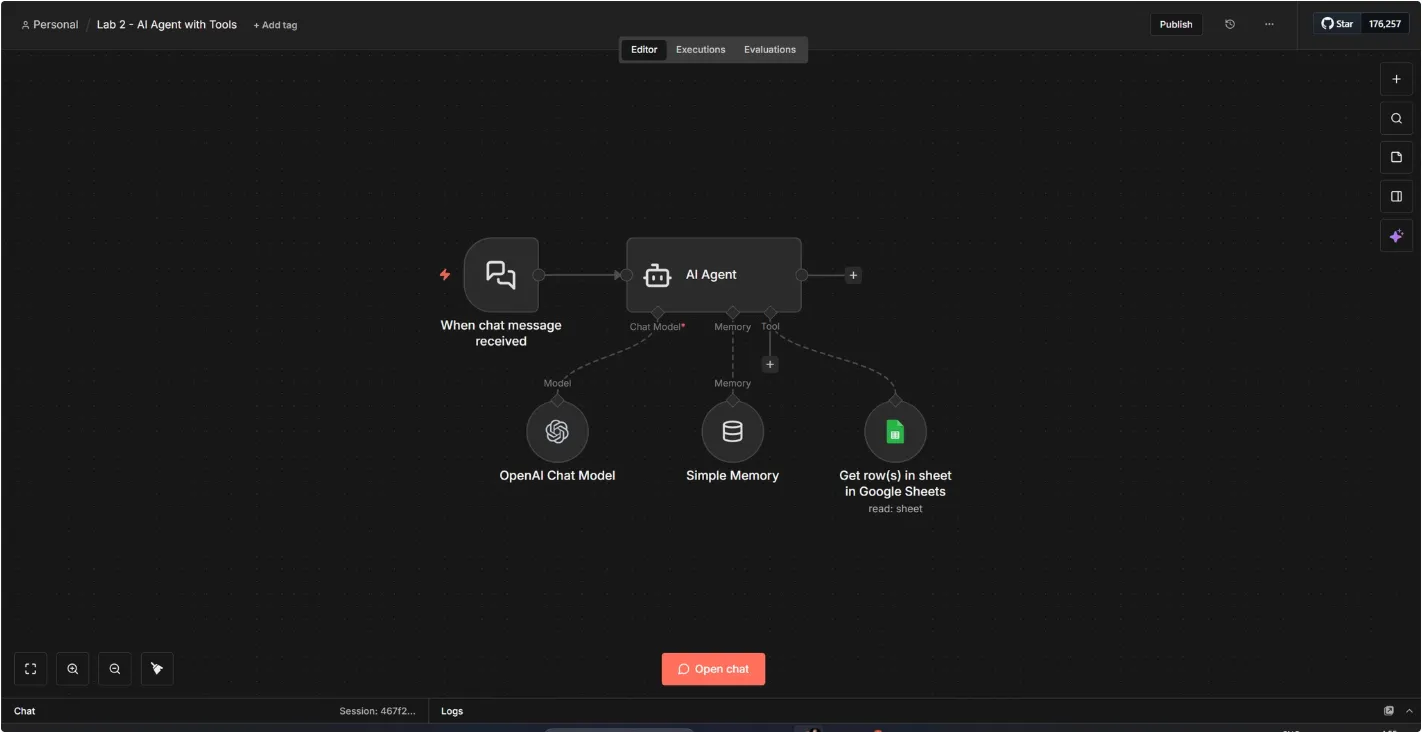
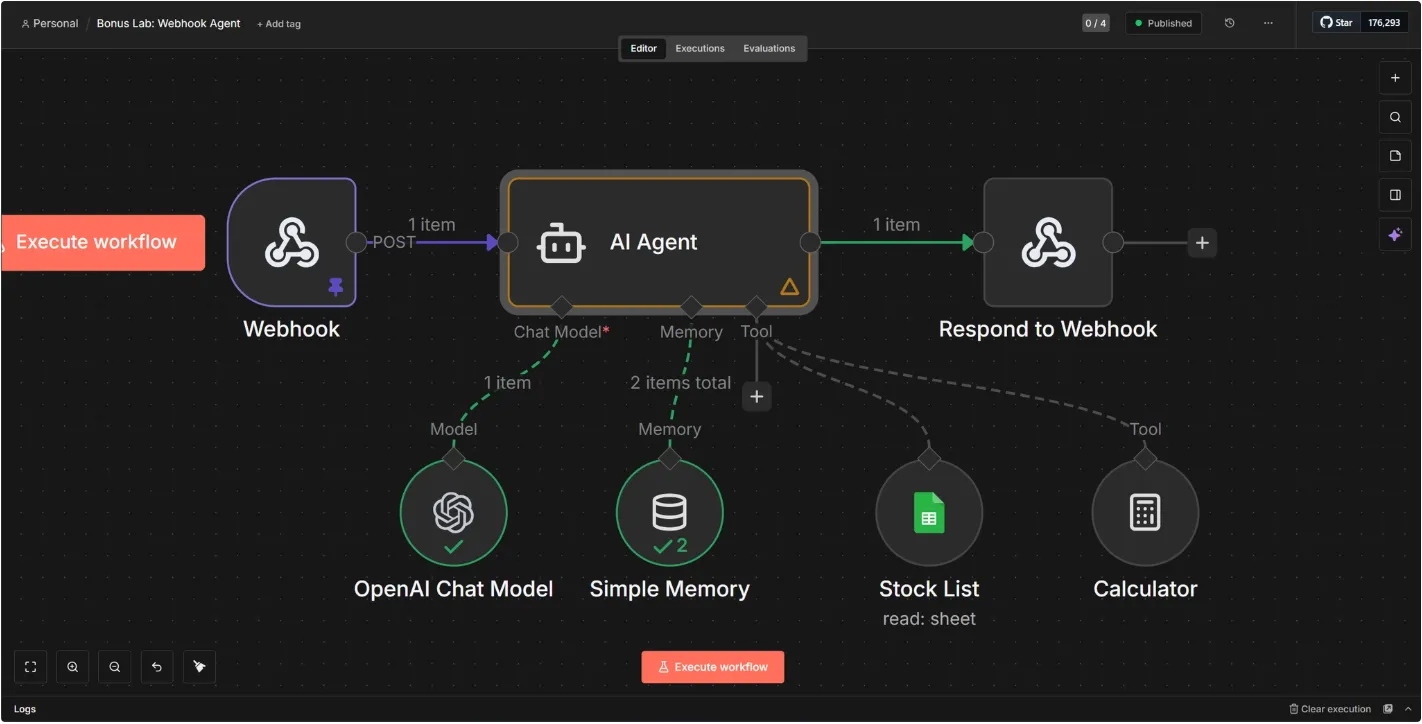
Six workflows from our n8n labs. Notice how little is on each canvas: a trigger, a handful of nodes, and one AI node doing the judgement.
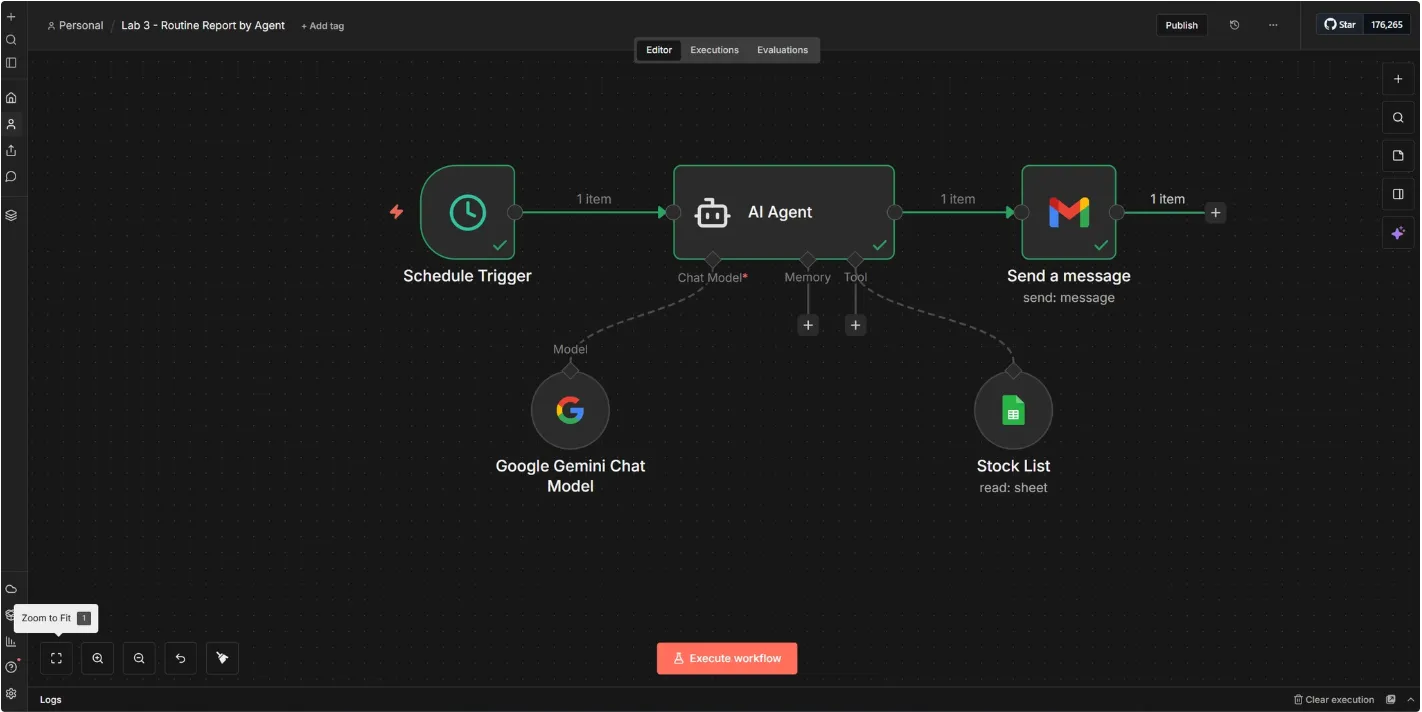
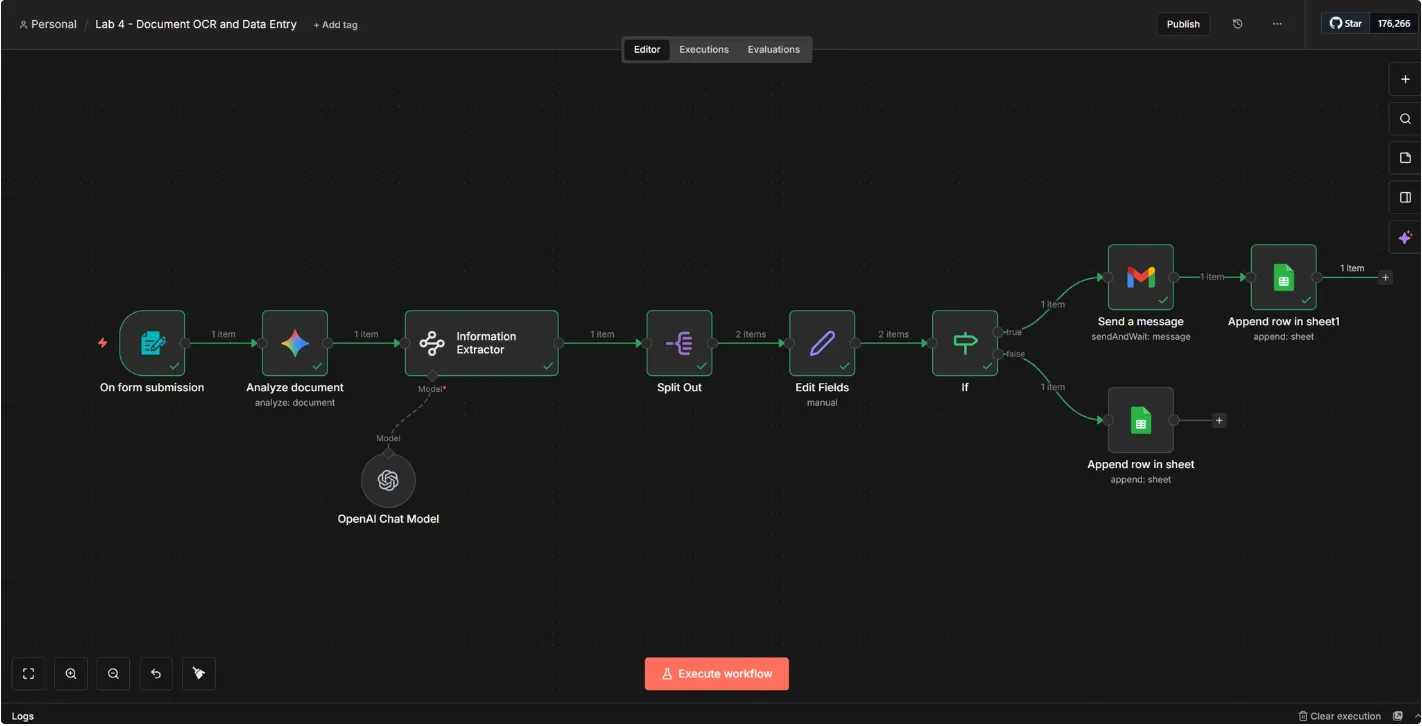
n8n canvas: schedule trigger into an AI agent with a Google Sheets tool, emailing the result via Gmail
Routine report by agent
Schedule → agent reads the sheet → Gmail. The Example 05 shape.
n8n canvas: form submission, document analysis, information extractor, then a conditional split to Gmail or Google Sheets
Document OCR & data entry
Upload → extract fields → IF → sheet or human. The Example 04 shape.
n8n canvas: supplier statement PDF and a goods-received sheet merged, reconciled, then converted to an Excel file
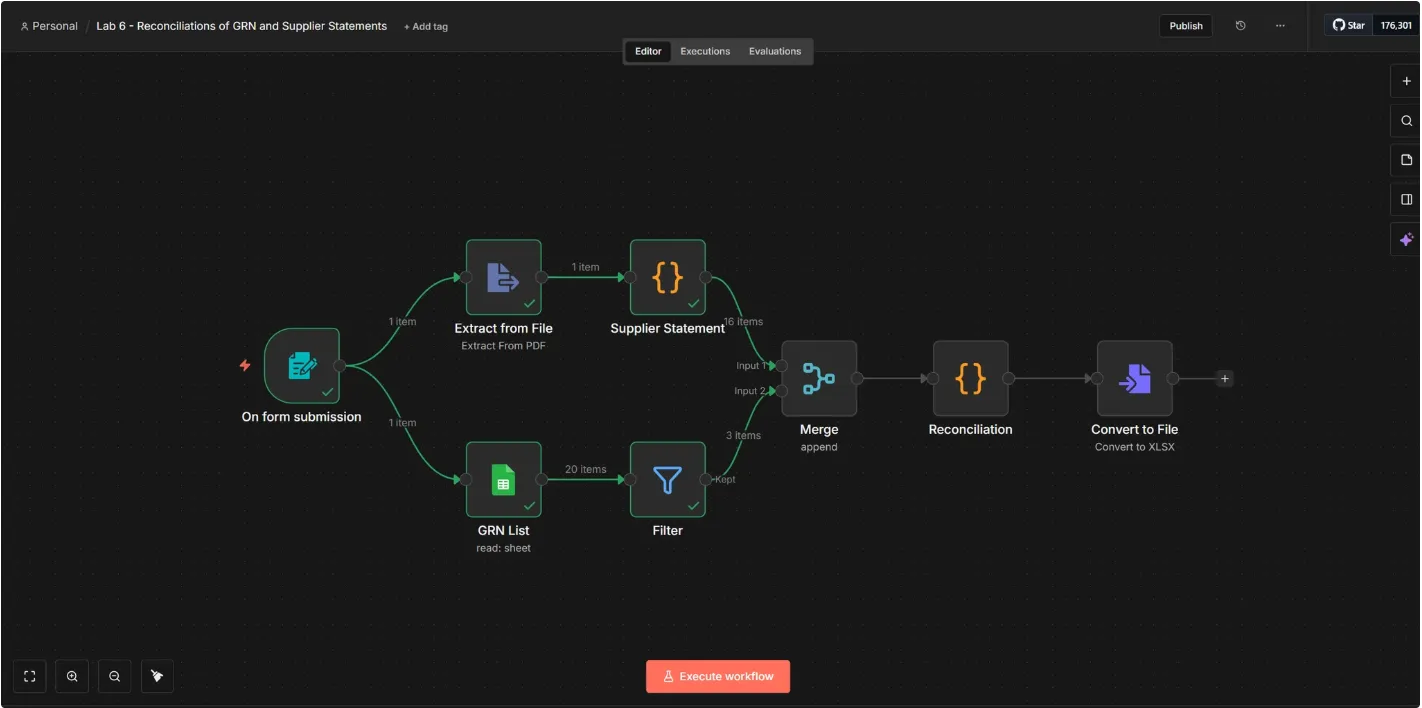
Supplier statement reconciliation
PDF + goods-received sheet → merge → match → Excel out.
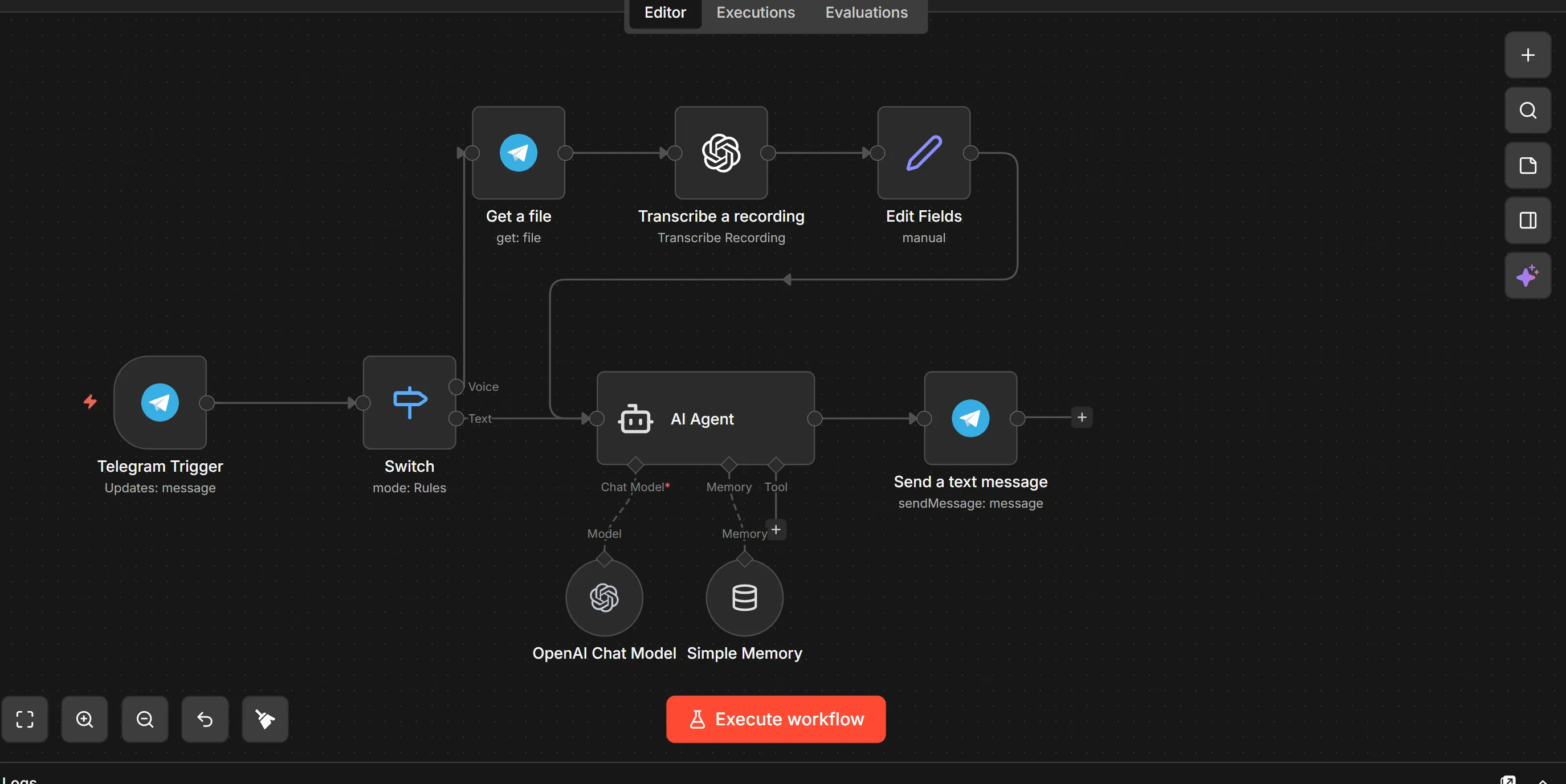
n8n canvas: Telegram trigger switching between voice and text, transcribing audio, then answering through an AI agent
Voice & text assistant
Telegram → voice note transcribed → agent replies in chat.
n8n canvas: chat trigger into an AI agent with a chat model, memory and a Google Sheets lookup tool
AI agent with tools
Chat → agent with memory + a sheet it can look things up in.
n8n canvas: webhook into an AI agent with model, memory, a stock list and a calculator tool, responding to the webhook
Webhook agent
Any app can call it → agent with stock list + calculator → replies.

None of these took a developer. If you can describe the process, you can draw it — the prompts on the last slide write the first draft for you.

Section 3 of 3

The last moat is
how fast you ship.

Knowing the market and automating the back office still leaves one race: who puts a new customer experience live first. Vibe coding is how a non-technical founder gets there in a weekend instead of a roadmap quarter.

Example 06
Vibe coding for building velocity
See what's possibleThe Vibe Coding Showcase →
Example 06Vibe Coding · Building Velocity Showcase

Ship the idea while they're still scoping it

Velocity is the competitive edge
Two companies get the same idea on the same Monday. One ships a working version by Friday and starts learning; the other books a scoping call.
Built by the person who felt the problem
No translation layer. The ops lead who lives the workaround describes it and watches it get built — requirements stop getting lost in the handoff.
Prototype first, decide second
A clickable thing in front of ten customers settles an argument that three strategy meetings won't. Cheap to build means cheap to kill.
Fast, not reckless
Vibe coding gets you to a working prototype. Real customer data, payments or PII still need a review with someone technical before go-live.
Claude Code · outlet-waste-tracker
DAY 1
Spec
Screens
Working app
DAY 2
14 outlets testing
v2 shipped
No IT ticket 2 days
Baristas log waste on paper and nobody reads it. Build me something they'll actually use on a phone.
Built: 3-tap logging, photo optional, live per-outlet dashboard. Deployed to a link — try it on your phone now →

See what people with no engineering background have shipped: aitraining2u.com/vibe-coding/showcase

How It Actually Works

The software life-cycle, with AI in every phase

Software has always run through the same six phases. What's changed is that a non-technical person can now stand in each one — with AI doing the part that used to need a specialist.

1
Planning
You bring: the problem and who has it.
AI does: turns a rambling description into a scoped brief, success metric and cut-list.
2
Analysis
You bring: how the work really happens today.
AI does: writes the user stories, edge cases and the questions you forgot to ask.
3
Design
You bring: taste and the brand.
AI does: screens, flows and a clickable prototype in minutes — three versions to react to.
4
Implementation
You bring: the running commentary — “no, like this”.
AI does: writes the code, wires the data, deploys to a link you can share.
5
Testing & Integration
You bring: real users and nasty inputs.
AI does: writes tests, hunts its own bugs, connects to Sheets, Stripe or your n8n workflows.
6
Maintenance
You bring: what users complain about.
AI does: explains the code back to you, patches it, and ships v2 the same afternoon.

The phases didn't change — the cost of going round the loop did. Anything touching customer data, payments or PII still gets a technical review before it goes live.

Example 06 · PromptsCopy · Paste · Run

From “someone should build this” to a live link

1 · Problem → spec
I'm not technical. Here's a problem in
our business: [describe it — who suffers,
what they do today, the workaround,
how often, what it costs us].

Act as my product partner:
1. Ask me the 5 questions you need
   answered before anything is built.
   Wait for my answers.
2. Then write a one-page spec: the
   user, the job to be done, the 3
   screens, and the single success
   metric.
3. Cut it to a v1 we can build today —
   list what we're deliberately leaving
   out and why.
4. Flag anything that touches customer
   data, payments or PII so we get a
   technical review before go-live.
2 · Build it
Build the v1 from that spec. I want
something I can open on my phone and
hand to a colleague today.

Rules:
- Work in small steps and show me the
  result after each one — I'll steer.
- Keep it simple: one page where you
  can, plain language in the UI, no
  jargon on screen.
- Use [our brand colours / logo].
- Sample data first so I can click
  through it before we connect anything
  real.
- After each step, tell me in plain
  English what you just did and what
  I should test.

Then deploy it to a link I can share.
3 · Harden & hand over
We've tested v1 with [n] real users.
Here's what broke and what they asked
for: [paste the feedback].

1. Fix those, smallest change first.
2. Now be the sceptic: what would break
   this with 50 users, a bad input, or
   someone hostile? Fix what matters,
   list what doesn't.
3. Add the boring essentials: input
   validation, an error message a human
   understands, and a backup of the data.
4. Connect it to [Google Sheets /
   our n8n workflow / email].
5. Write a one-page handover for
   whoever maintains this: what it does,
   where it lives, how to change the
   common things.

Real examples built by non-engineers: aitraining2u.com/vibe-coding/showcase

Example 06 · ShowcaseBuilt by Prompting Open the showcase

Not slides. Working apps.

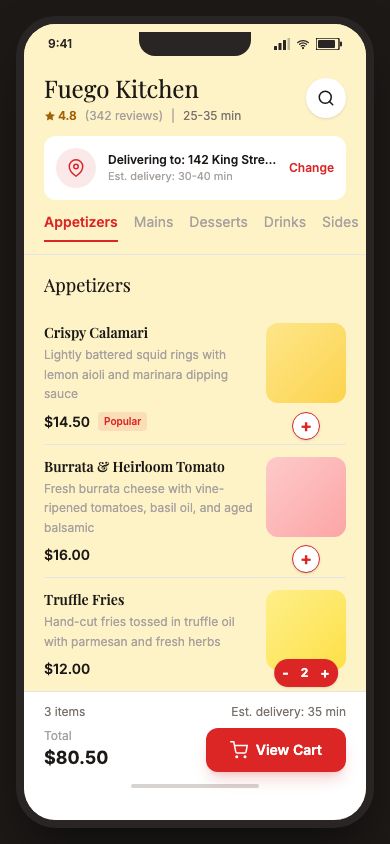
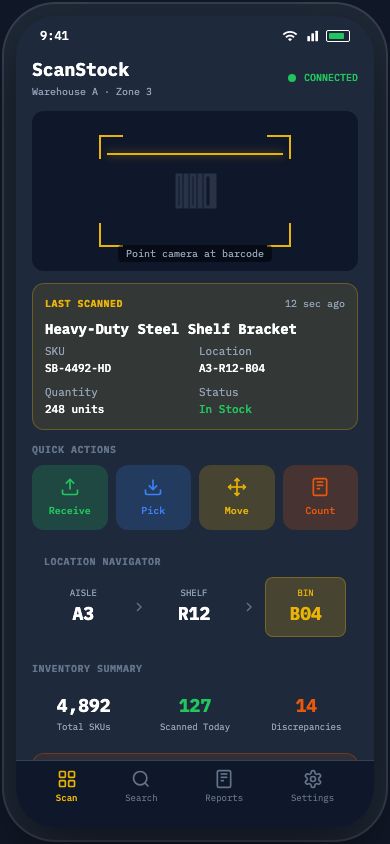
Every screen below is a real, clickable build — described in plain English and produced by prompting, not by an engineering team. Tap any one during the session and it opens live.
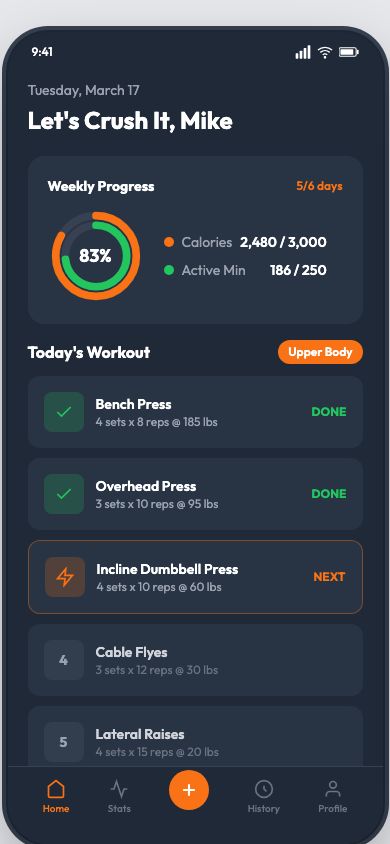
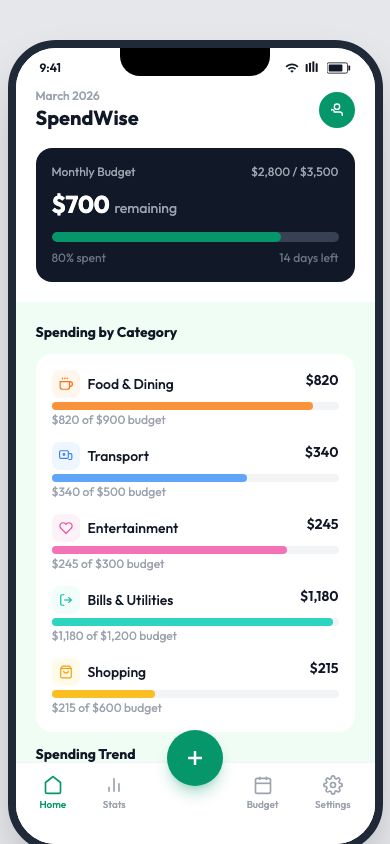
Six of 81 builds in the showcase — and every card carries the exact prompt that produced it. aitraining2u.com/vibe-coding/showcase

Example 06 · ShowcaseThe Internal Tools

The same method builds
the boring, valuable stuff

Consumer apps demo well. But the tools that actually move a business are the internal ones — the CRM nobody bought, the tracker living in six spreadsheets. Same prompts, same afternoon.
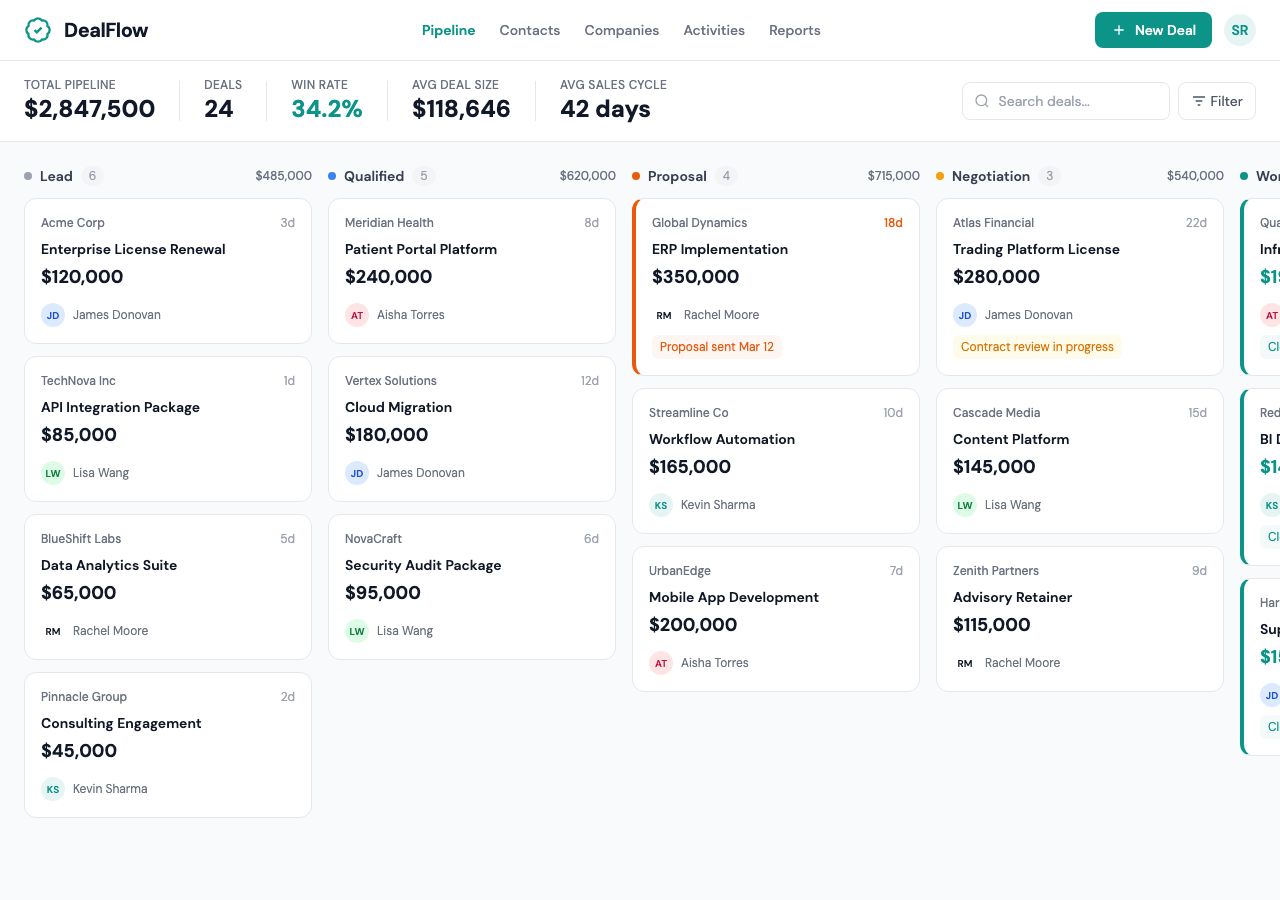
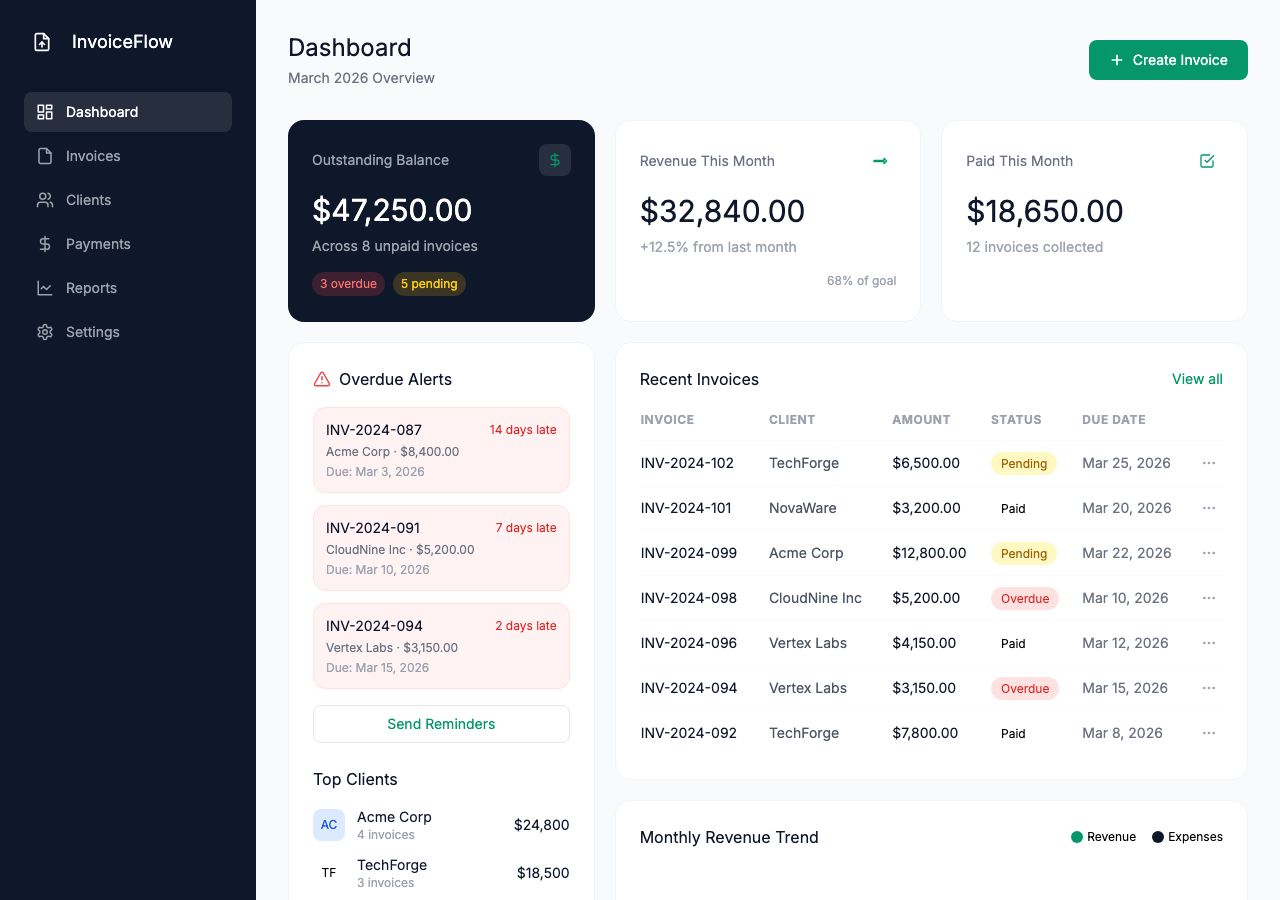
Four of 39 web builds in the showcase. Ask which of these your team currently does in a spreadsheet — that's your first build. See all 81 →

Example 06 · WorkedIllustrative Example

Two days, not two quarters

Remember Kopi Kita's benchmark gap — waste at 7.4% of COGS vs a 4.5% median? Nobody could fix it because nobody could see it. The ops lead — no coding background — built the tool herself:

Waste-logging app · the old route vs the vibe-coded one
PhaseTraditionalVibe coded
Spec & approval3 weeks1 hour
Vendor / IT queue6–10 weeksnone
Build v18 weeks1 day
Pilot & fix round4 weeks1 day
Live in front of staff~5 months2 days
What it bought

Three taps per waste event, a photo if it's odd, one live dashboard per outlet. Waste visible daily instead of at month-end — 7.4% → 5.1% in one quarter, without a single new hire.

WHAT ELSE PEOPLE BUILD

Client portals, quote calculators, booking tools, internal dashboards, onboarding apps — built by accountants, marketers and ops leads.

Open the showcase

Illustrative figures for teaching. The showcase link opens 81 working builds — each one carries the prompt that produced it.

Recap

The faster-than-them loop

1
Research
A sourced dossier and a battlecard per rival — including the tells they leak in their job ads.
2
Benchmark
Your numbers in a quartile, every gap priced, and the one gap you're allowed to ignore.
3
Monitor
A scored weekly digest — so what, do what — instead of fourteen headlines you skim.
4
Automate
One repetitive process mapped into n8n, with AI doing only the judgement and humans handling the rest.
5
Build
Vibe-code the tool yourself — through all six SDLC phases — and get it in front of users in days, not quarters.
6
Compound
Put the loop on a schedule. The advantage isn't any single run — it's running it 52 times while your competitor runs it once.
Back To The Gap

Every week you wait,
the gap gets wider

The blue line does not slow down to wait for you. That is the whole argument for running the loop weekly instead of annually.

Time Pace Technology Understanding Change The Gap

Technology — Exponential

New models and tools compound on each other, doubling capability again and again.

Organisational Understanding — Linear

Awareness grows steadily as people are trained and exposed to what's possible.

Organisational Change — Linear, Slower

Process, structure and incentives move even more slowly than understanding does.

Everything today was about steepening the red line: prompts that compress research from a fortnight to an hour, n8n workflows that run without anyone remembering, and tools shipped in days. You cannot bend the blue line — you can only close the distance to it faster than your competitors do.

You don't out-think
your competitors.
You out-cycle them.

A prompt gives you one good answer. A workflow gives you that answer every week, forever. And a tool you shipped in two days is learning from real customers while your competitor is still writing the brief.

The Bigger Picture

A competitive five-sided skill set

Today you ran three of the five: analytics, agentic automation and vibe coding. The companies that pull furthest ahead build capability across all five points — and let orchestration conduct the lot.

AI OrchestrationConduct all five together
AI Agentic AutomationReclaim the hours lost to busywork
AI Vibe CodingShip the tool without waiting on IT
AI AnalyticsDecide on data, not gut feel
AI Security & GovernanceDeploy AI safely & in policy
AI MarketingGrow demand & engage customers

Each point is a hands-on, HRDC-claimable AITraining2U course — the pentagon from our Manifesto, made practical. Next: where to learn each →

Keep Building

Our courses at AITraining2U.com

All courses are HRDC-claimable — available as enterprise & public workshops. AITraining2U.com

AITraining2U

Thank you.

Pick one competitor and run the dossier prompt this week. Then automate the watch, and ship one small tool. One thing live beats five ideas noted.

Keep learning
AITraining2U.com
Next step
Book a Course →

Practical. Proven. Purposeful. — AITraining2U PLT

QR code linking to these webinar slides at aitraining2u.com
Take the deck with you
Every prompt, copy-ready